Up

Share your Content with the FDT Community

You want to join the FDT community? That’s easy, simply send us your news and be part of the FDT community page

[contact-form-7 id=”6383″ title=”Take Part”]

Linux builds have been tested on Ubuntu but should run on other distributions too.

With the download of FDT you accept our EULA

Featured

FDT Views/Editors follow Dark Theme

With this release FDT can easily switched to dark theme:Simply select the Dark theme and apply. The Dark theme is available since Eclipse 4.4 (Luna). Older versions of Eclipse (and FDT) does not support color themes of this form. The FDT views and editors will switch to their default dark color set: In case you […]

by FDT Team

FDT Newsletter

Subscribe to our FDT mailing list and get the latest news and vouchers! * indicates required Email Address * First Name Last Name

by FDT Team

FDT Milestone 10 – 10 years anniversary

We‘re happy to announce FDT Milestone 10! It‘s been 10 years since our first FDT release and a lot happened since last years Milestone 9. We went on to improve FDT and your IDE experience. Here is a list with our new key features: Ant Project Generator Dump launch configuration Library Project Template ActionScript refactorings […]

by FDT Team

Library Project Template

This new FDT release contains features to support a more fluent development of SWC libraries. The primary starting point to develop a library is the new Library Project Template for AIR or Web: This template creates an empty library project containing two source folders: All compilation units to include into the library should be placed […]

by FDT Team

Release 9.9 – Project groups

With this release the FDT Explorer can present projects in groups: Each Project Group is a set of workspace projects (i.e.: Working Set). Each project can be a member of one group and can not be shared among groups. Project Groups are logical structures shown inside FDT Explorer. Neither they represent nor they change the […]

by FDT Team

Welcome FDT Milestone 7

August 20, 2013 by FDT Team

Today, the Powerflasher team released our 7th milestone release of FDT.

Since our last major release 2012, we’ve released more than 70 new features and improvements while also improving performance and stability. To celebrate this, we’ve not only rolled up our sleeves to bring a collection of features such as new refactorings and compiler constant management, we’re also announcing a lower pricing (starting from 24€) as well as offering the option to purchase non-expiring licenses (starting from 99€) as well. To commemorate this release, and the 7 years of FDT, we’re calling it: FDT Milestone 7.

The web changed a lot in the last years and we embrace that, but Flash and its ecosystem is still a great technology in many meaningful areas. It is exciting to see that there is a strong Flash community that found so many great niches for professional jobs. So we´re still committed, we still love Flash, its possibilities from mobile development to advanced game development and much more. We´re listen to you to make sure that FDT is the best IDE for Flash developers, while also making it accessible to as many people as possible. We are continuing full speed ahead with FDT’s development. Join us to push the Flash development community forward and help us to shape the future of FDT.

Feature Highlights with this release (maaany more if you´re still on FDT5)

  • Change Function Signature
  • Compiler Constant Management
  • Improved SDK Management – Add Pure AIR SDKs & SDK Folders
  • GUI for Override / Implement Methods
  • Advanced Telemetry Options
  • Haxe 3.0
  • Autocompletion For Compiler Options

New Pricing and Non-Expiring option

Since FDT 5.6 we´re done with major releases and started to do iteration releases even weekly – but just possible with a subscription model. While our most active users love the benefits of this subscription, it is not the perfect model for everyone. So we´re coming up with a solution and can offer now a non-expiring license as well. That means you’ll be able to use your FDT license for as long as you like to, even when your update subscription has expired. We’re offering this as an upgrade option with along our 12 month and 24 month subscription.

Existing Customers

This update is of course free to all current FDT subscribers and OpenSourceSupporters – just keep an eye out for the update icon in the toolbar! And of course we still offer the free version of FDT as well.

Check out this Video of the New FDT features. We hope you love it as much as we do.

Your Powerflasher FDT team.

FDT 5.5 now released

May 10, 2012 by Carlo Matic

We are thrilled to finally release FDT 5.5. Many of you have been using 5.5 beta and we received loads of fantastic feedback that helped us introduce you to the best FDT ever. FDT 5.5 is a free update for all FDT 5 customers. We added heaps of fantastic new features to this big release and we’re sure you’ll like them. The most awesome feature we integrated is the new community feature “SWF Bridge“. It allows you to write your own FDT plug-ins in ActionScript in no time. Nearly everything is possible, so go ahead and check out Alan’s blog post and get started with your first personal FDT Plug-In right away. We also created a microsite where we gathered all relevant information. Furthermore we worked hard on FDT’s Haxe support and implemented some improvements. And there’s a lot more to discover:

New Features

Improvements

  • QuickFix for new code should take priority over Assist
  • Profile & Debug without compiling
  • Flexible SDK setups
  • New Project Templates
  • New Project Template Features
  • Set default for Haxe Flash projects to AVM 2
  • Captive runtime GUI support
  • Change Exit Postion For ‘Create Field In Class…’
  • Update Haxe SDK OSX, Linux & Win to 2.08
  • Update Neko OSX, Linux & Win to 1.8.2
  • See more in our JIRA and in our release notes.

Software Subscriptions

With FDT 5.5 we are introducing a whole new license management: FDT subscriptions. Software subscriptions aim at precisely matching your needs with respect to time. Subscribe to FDT when you need it and cancel it when you’re done. This allows you to react a lot more flexible to the quickly changing, dynamic environment. From now on, FDT will periodically check your license’s validity, enabling you to allocate your budget to those times when you need FDT the most. Please make sure that FDT is allowed to use Port 80 to communicate with our license server. For more details please check our blogpost. Some great examples and sample calculations to this long awaited novelty are presented in this blog post.

Download

To download FDT 5.5 either insert http://fdt.powerflasher.com/update/fdt5 under “Help -> Software Updates -> Find and install…” in Eclipse or download the standalone version on http://fdt.powerflasher.com/buy-download.


Many thanks to all the beta testers, keep posting your feedback!
Happy coding!

FDT 5.5 Beta released!

April 16, 2012 by Carlo Matic

We are proud to announce our next great and big update for FDT 5. Right now it’s a beta version but the final release is planned very soon. It will be a free update for all FDT 5 customers. We added some great new features to this “major minor release” and we’re sure you’ll like them. The main feature we integrated is the new community feature “SWF Bridge”. It allows you to write your own FDT Plug-Ins in ActionScript. Nearly everything is possible, so check out Alan’s blogpost and get started with your first official FDT Plug-In. But there is a lot more in it:

New Features

  • SWFBridge
  • Blackberry Integration
  • ANE Support
  • FDT Setup Wizard
  • Conditional Breakpoints
  • Instance Breakpoints
  • Exception Breakpoints
  • Selectable Debugger SDK
  • Quick Fix to generate a getter and/or setter at Class-Instance
  • Quick Assist to generate a getter and/or setter at Class-Instance
  • Enable choosing the default view player for debug/run dialog

Improvements

  • Automatically rename fields when create getters and setters.
  • Change field to private after setter/getter generation
  • QuickFix for new code should take priority over Assist
  • Profile & Debug without compiling
  • Flexible SDK setups
  • New Project Templates
  • New Project Template Featuers
  • Set default for haXe Flash projects to AVM 2
  • Captive runtime GUI support
  • Change Exit Postion For ‘Create Field In Class…’
  • Update haXe SDK OSX, Linux & Win to 2.08
  • Update Neko OSX, Linux & Win to 1.8.2

Known issues can be found in our Jira.

New License Management

We also added a complete new license management to support a highly requested new licensing model: subscriptions. With the new license management FDT will verify the key with a license server on our side. A blogpost with detailed information will be released a few days before the final release.

Download

Update: FDT 5.5 is about to be released; we have disabled the download of the beta to avoid confusion. Stay tunned everyone!

To download the FDT 5.5 Beta just go to our special code site and enter the special code FDT55BETA. An E-Mail with a beta license key (valid until May 8th) and the download links will be send to you right after registration.

Issuetracker

If you find any bugs or other issues during the beta test please let us know in the Jira.

We wish you a lot of fun testing the new version and are excited to hear your feedback.

Happy coding!


Extend & Customize FDT With SWFBridge

April 16, 2012 by Alan Klement

At the core FDT has always been about comfort, customization and community. With FDT 5.5, the team delivers a new feature that is a powerful combination of all 3 – SWFBridge.

Create Your Own Plugins For FDT

Update: Check out the SWFBridge microsite.

FDT’s SWFBridge is a platform that allows developers to use Actionscript & Flex to create new features and extend existing ones. Here are a few examples of what you can build using AS & Flex:

Community & Open Source

The FDT team strongly believes in transparency, sharing and open source. With these principals in mind, we have open sourced the API of the plugin as well as provided a few demos and examples.  We encourage the community to create and share what they build as well as provide feedback on how we can make it better.

Getting Involved & SWFBridge Group

Leading up to the FDT 5.5 release, the team will continue to update documentation, examples and demos for everyone to use – things have only just begun.  The best way to learn about new videos, demos, developments or to ask questions, join the FDT SWFBridge mailing list. This is best and fastest way to learn and get involved with SWFBridge.
We’re very excited about the future and we can’t wait to see what the community builds.

FDT Featured In Automating ActionScript Projects

January 19, 2012 by Alan Klement


Author and FDT fan Sidney de Koning has just completed a new book titled ‘Automating ActionScript Projects With Eclipse and Ant‘. It’s a short and sweet book that gives a nice introduction for anyone interested in integrating Eclipse & Ant into their Flash workflow.

In this book, you’ll find various powerful Ant scripts as well as examples using FDT’s built in Ant tasks. The author also touches on using workspaces, shortcuts, FDT installation, Mylyn and Source Code Management. My favorite part is the section on ‘Setting Up Web Deployment’, where Sidney shows useful techniques when automating tasks such as setting up HTML files, creating zips and making backups of your projets.

Even though the book was written using FDT 4 examples and workflows, it has good information for anyone using FDT 5. If you’re interested in the plugin version of FDT 5, use this site.

Together with Sidney, we are raffling off some copies for you. If you want to be the lucky winner of one of 3 ebooks, 2 hard copies or 1 FDT 5 Max license, simply tweet about this. Tweet about Ant, Sidney’s book, and/or FDT. Just make sure to use the hashtags #ANT and #FDT in your tweet.

FDT 5 Press Release

October 27, 2011 by Carlo Matic

FDT 5 released with multiplatform approach.

  • Release of FDT version 5.0
  • Free edition and cheaper MAX edition
  • HaXe Support for HTML5, PHP, JavaScript, WebGL
  • Mobile Support for Android, iOS and AIR

Aachen, October 26, 2011

Exactly one year after the release of FDT 4.0, the German digital agency Powerflasher presents the fifth version of their Flexible Development Toolkit.  The former three editions were reduced to the free to use “FDT Free“ and the from now on more affordable “FDT Max“ edition. The Eclipse-based IDE can now also be used for HTML5, PHP, JavaScript, WebGL and other platforms due to the novel haXe support. New as well, is the mobile support for Android and iOS via Adobe AIR, advanced refactorings and much more.

The professional development environment FDT addresses web developers, interactive developers, Flash developers, as well as game developers and is used in agencies, studios and universities worldwide. The uniqueness of the IDE, which was inspired by JDT (Java Development Tool), is the powerful live parser.  The source code is understood and interpreted while being written by the developer without needing to save or any other interruption. Errors are visualized in real time and the intelligent features react instantly in order to take the work out of developers’ hands. This is enables a highly efficient workflow to write sophisticated, standard compliant code.

The new version is equipped with more features for a faster workflow, e.g. extended refactorings, ASDoc support, automated SDK merging and SWC source attachment; however, the most notable novelty is the new diversity of supported platforms. With FDT 5, the developers at Powerflasher no longer focus merely on the platforms Flash, Flex, and AIR, but expand the supported programming languages to contemporary HTML5, JavaScript, PHP, WebGL and many more via haXe (http://haxe.org).

The open source language haXe is particularly interesting because of its cross-compiler: one object-oriented source code can create frontend as well as backend for different platforms. Learning haXe takes Java or Flash developers only a few hours thanks to the similar syntax, enabling them to leverage a whole variety of technologies. FDT 5 helps with auto completion and project templates that make it a lot easier to start projects and get familiar with haXe.

Another crucial focus is on the comfortable implementation of projects particularly for mobile platforms. The programmer can set all relevant settings for an iOS or Android application in a wizard and even instantly debug on the device.

FDT as a community-oriented project has been on the market for over 6 years. When choosing new features the agile development team lets the users decide. That’s how over the course of time a “Most Wanted Feature” list was created, which has a significant influence on future versions. Users post their feature request and feedback to the public bug tracker and vote. One of the most wanted features was ASDoc support, which makes it easier to understand the self-written source code by showing a detailed documentation for classes and methods directly in the IDE. An overview of all new features is listed here http://bit.ly/fdt5rel.

With the release of version 5, there are no longer the three chargeable editions Pure, Plus, and Max, but only FDT Free and FDT Max. FDT Free is a full version free of charge that addresses developers of small projects and beginners. FDT Max is the premium edition for professional developers and companies with more features and 24H dev2dev support. FDT 4 Max users can upgrade to FDT 5 for 49.- EUR, FDT 4 Pure and Plus customers for 99.- EUR, FDT 3 customers for 199.- EUR, new customers pay 499.- EUR, which is 100.- EUR less than FDT 4 used to be.

Students receive FDT5 at half price and universities obtain free of charge. Furthermore, Powerflasher thank dedicated open source projects with a free FDT Max version.

More information can be found on the new community site of the product: http://fdt.powerflasher.com

Printable graphical material on request: presse@powerflasher.de

—————————-

Powerflasher GmbH
Drehturm
Belvedereallee 5
52070 Aachen, Germany

FDT 5 coming soon!

August 30, 2011 by Carlo Matic

We’re proud to officially announce FDT5 in October. A microsite will guide you to all details and news about it in the next weeks.

Just like the Internet evolves with new technologies, FDT continuously takes technological leaps. We are currently working hard on FDT 5 to bring you a whole new level of flexibility, power and comfort. New technologies, new editions, new features, new prices, and an awesome surprise will blow your mind. FDT 5 will be launched in October and we want to celebrate the news in four steps. Little by little we will show you more and more about the new version of FDT on our new HTML5 promotion site (created in FDT 5):

http://FDT5.com

With FDT 5 we want to evolve the future as the most flexible development tool for interactive coders and game developers. Flash and Flex will still be the #1 technologies, but it will also focus on HTML5 / JavaScript / WebGL, PHP with Haxe and mobile and game development.

Share the news on Twitter or Facebook and win an FDT5 Max license:
@FDT5 release is announced for October and will focus additionally to AS3 & MXML on HTML5, JS, WebGL, PHP and more via @FDThaXe

Get thrilled for the new FDT and stay tuned!

FDT 4 Milestone 3 "Flex 4 Support" released

June 30, 2010 by Michael Plank

Live Presentation

The FDT team is proud to announce the release of FDT 4 Milestone 3. This milestone release is dedicated to Flex 4 and includes support for the new MXML 2009 language features like Spark, FXG, States and the new language tags.

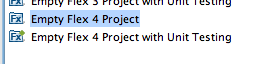
Flex 4 Project Types and Templates

In milestone 2 we’ve introduced the new SDK and project management which features project types, project templates and a simplified SDK management. In M3 we could leverage this new system and simply add the new project types and templates for Flex 4. We are also shipping the Flex 4 SDK and adding it to your installed SDKs automatically.

Flex 4 States

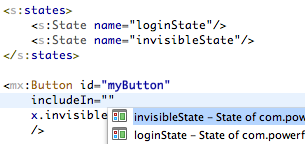
Flex 4 introduced a nice new way to define and use states in your MXML view classes. FDT 4 M3 fully supports this new concept and offers autocompletion, occurrence marking as well as rename refactoring for states.

FXG Support

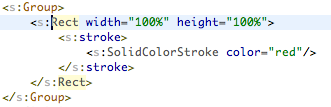
Make use of the new FXG declarative graphics format either by using external .fxg files or directly inside your MXML classes.

New Language Tags

Use the new MXML 2009 language tags like “Declarations”, “Definition”, “Library”, “Reparent” etc.

Download

Existing FDT4 users: If you have FDT4 already you can get the latest update from the Eclipse menu item Help->Check for Updates
New FDT4 users: If new to FDT4, you can download the M3 standalone installer here for a 30 dyas trial.
Current FDT3 users: If you hold a FDT 3 license already, either Pure, Professional or Enterprise, you can run full FDT4 Beta features until released. Enjoy!
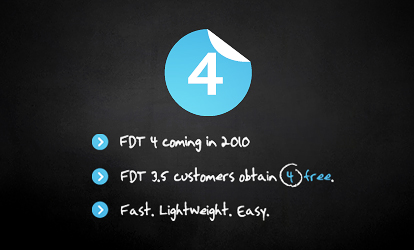
New FDT 3.5 users: If you bought FDT 3.5 after 25 January 2010 FDT 4 is free for you!
  • Existing FDT4 users: If you have FDT4 already you can get the latest update from the Eclipse menu item Help->Check for Updates
  • New FDT4 users: If new to FDT4, you can download the M3 standalone installer here for a 30 dyas trial.
  • Current FDT3 users: If you hold a FDT 3 license already, either Pure, Professional or Enterprise, you can run full FDT4 Beta features until released. Enjoy!
  • New FDT 3.5 users: If you bought FDT 3.5 after 25 January 2010 FDT 4 is free for you!

Notes

If you have installed FDT 4 M2, please delete the FDT folder located in the users directory. We’ve made small changes to the project type and template XML files. FDT will copy the new files automatically after you’ve deleted the FDT folder.

Press Release: FDT 4 – Milestone 2

May 17, 2010 by Carlo Matic

At the beginning of 2010, the multimedia agency Powerflasher released the current Version 3.5 of the Development Tool for Flash (FDT). Now they’re back with yet another enhanced version. September 2010 is the date already set for FDT 4 – the next version of the Eclipse-based Flash development environment. Once again it promises to bring a host of improvements and brand new features for Flash developers. “The ongoing development of FDT is a continuous, dynamic process for us. By launching our new releases in quick succession we are always striving to provide our users with the most powerful FTD version possible for the development of their Flash projects,” said Carlo Blatz, Founder and Managing Director of Powerflasher. The agency also has a special offer in store: All those users who purchased the previous Version 3.5 after 25 January will be able to upgrade to the new FDT 4 free-of-charge. (more…)

Attention: Last chance for FDT wear fanatics!

November 6, 2008 by FDT Team

Starting today, there’s only one week left to indent for a t-shirt or hoodie from the FDT assortment. Don’t miss the chance to become one nof the most superbly dressed persons in the world! Once again, the mail adress that you should send your order to is contact@fdt.powerflasher.com. So, hurry up 😉

Cheers,

Christopher

Get FDT5