Up

Share your Content with the FDT Community

You want to join the FDT community? That’s easy, simply send us your news and be part of the FDT community page

[contact-form-7 id=”6383″ title=”Take Part”]

Linux builds have been tested on Ubuntu but should run on other distributions too.

With the download of FDT you accept our EULA

Featured

FDT Views/Editors follow Dark Theme

With this release FDT can easily switched to dark theme:Simply select the Dark theme and apply. The Dark theme is available since Eclipse 4.4 (Luna). Older versions of Eclipse (and FDT) does not support color themes of this form. The FDT views and editors will switch to their default dark color set: In case you […]

by FDT Team

FDT Newsletter

Subscribe to our FDT mailing list and get the latest news and vouchers! * indicates required Email Address * First Name Last Name

by FDT Team

FDT Milestone 10 – 10 years anniversary

We‘re happy to announce FDT Milestone 10! It‘s been 10 years since our first FDT release and a lot happened since last years Milestone 9. We went on to improve FDT and your IDE experience. Here is a list with our new key features: Ant Project Generator Dump launch configuration Library Project Template ActionScript refactorings […]

by FDT Team

Library Project Template

This new FDT release contains features to support a more fluent development of SWC libraries. The primary starting point to develop a library is the new Library Project Template for AIR or Web: This template creates an empty library project containing two source folders: All compilation units to include into the library should be placed […]

by FDT Team

Release 9.9 – Project groups

With this release the FDT Explorer can present projects in groups: Each Project Group is a set of workspace projects (i.e.: Working Set). Each project can be a member of one group and can not be shared among groups. Project Groups are logical structures shown inside FDT Explorer. Neither they represent nor they change the […]

by FDT Team

Bracket Region Indicator

June 8, 2015 by FDT Team

The enclosed region of brackets is present in the left vertical ruler:
BraceRangeIndicator
For easy navigation the cursor jumps to the opposite bracket with
Ctrl-Shift-P (Cmd-Shift-P)

The bracket highlight annotation is adjustable in the preferences:
BraceRangeIndicatorPreferences

Part Matching

June 8, 2015 by FDT Team

Part matching can be activated for all FDT proposals:
ProposalPartMatchPreference

With activated part matching a proposal is shown if it contains the current word:
ProposalPartMatch

How to install Subversive in Eclipse Juno with FDT

March 25, 2013 by Ain Tohvri

Since FDT can also be installed as a plugin on the latest Eclipse IDE, the FDT Team also looks ahead and tests against the latest Eclipse releases.

In Eclipse Juno the installation of the Subversive SVN plugin has changed a bit. The SVNKit/JavaHL selection screen no more appears right after the Subversive installation finishes so the SVN connectors need to be installed separately.

Following steps will help you to get Subversive going:

  • Install Subversive from the Juno update site http://download.eclipse.org/releases/juno
    You can find it under Collaboration > Subversive SVN Team Provider
  • Add Subversive Connector update site from Available Software Sites > Add…
    Define the Update site name of your liking and use http://community.polarion.com/projects/subversive/download/eclipse/3.0/update-site/ for the location.
  • Install Subversive SVN Connector by choosing the added Subversive SVN Connector update site, e.g. Subversive SVN Connectors > SVNKit 1.3.8 Implementaton (Optional).
    NB! If the SVN server you’re using runs SVN 1.7, make sure to select the respective SVNKit 1.7.x Implementation.

Useful references:

Feel free to add your experiences or ask your questions.


FDT and APDT

March 16, 2012 by Carlo Matic

APDT – the Agile Pseudocode Development Tool – is a great plugin to use with FDT.

The tool by Envision automatically produces source code and documentations from simple models. APDT instantly generates different source codes and can export pseudocode to Java, JavaScript, ActionScript and PHP. The user interface is easy to use and smoothly integrates into Eclipse. APDT effectively helps minimizing the gap between developers and decision makers. Having great liberty from any formal modelling rules, APDT is a fun and efficient way to augment your workflows in FDT. In addition to the APDT introduction video we have created a short video in which we show how to use APDT in FDT.

APDT Introduction Video

APDT in FDT

FDT and ZINC

February 3, 2012 by Carlo Matic

Some of you might already have seen this on our Newsletter (send us an email to subscribe): something that we really like to introduce to you is the symbiosis of FDT and Zinc.

Zinc Builder is a powerful tool for using your existing AS3 and MXML skills to create desktop (and kiosk) applications.

FDT 5 and Zinc 4.0 in fact perfectly match together. We created a thorough tutorial on how to profit from the beautiful team play. For more information, also check out this collection of useful links. Those of you who have tried an earlier version of Zinc before should definitely give it another try. The symbiosis with FDT 5 is truly worth another shot.

Did you know…? – Refactoring in FDT 5

January 27, 2012 by Carlo Matic

Another video tutorial that we want to show you in order to familiarize you with our video gallery is on the FDT 5 Advanced Refactorings.

There is more information and a detailed tutorial with screenshots in our docs.
We put a lot of effort in the video tutorial site and continuously add more content. Make sure to stay tuned!

Did you know…? – Source Attachment for SWCs

January 25, 2012 by Carlo Matic

Continuing the series of featured video tutorials in order to make you familiar with our FDT video site, this time we want to recommend you the tutorial on Source Attachment for SWCs.

The whole elaborate tutorial can be found in the docs. Make sure to check the video site for more tutorials; we work hard to provide you an intense tutorial experience!


Did you know…? – Breakpoint Support

January 23, 2012 by Carlo Matic

Today we want to feature the FDT video site. We heard that many people are not aware of the variety of video tutorials. This time we recommend you the video on breakpoint support in the Flex SDK.

The complete tutorial with screenshots and further elaboration can be found here.

We regularly add more tutorials and videos for you. If you have created video tutorials yourself, let us know. There are many community resources in our docs as well.

Did you know? – The new FDT Documentation.

November 9, 2011 by Carlo Matic

When we launched FDT 5 with all its novelties, we also renewed everything around it. When browsing our new website, you may have already noticed the new documentation and support pages. In this blog post, we want to give a little introduction on where to find first aid.

The Docs are generally divided into:
The FDT Starting Guide
Videos
Flash Tutorials
haXe Tutorials
Community Resources
Online Workshops
References
Features
Downloads
Suggested Eclipse Plugins
FAQs
and Release Notes.

You will find a lot of useful information on FDT 5 and FDT in general. We encourage you to let us know whenever you are missing something in the docs. They are constantly evolving as we plan to invite the FDT community to contribute. If you are interested in helping documentation grow please contact us.

We hope you will enjoy the new docs and the popularity will grow, so everyone has the easiest way starting with FDT 5 🙂

Setting Up Away 3D 4.0 & Loading A 3D Model

August 31, 2011 by Alan Klement

Today I’d like to release a quick demo about a setup for using Away3D 4.0 with your FDT projects. We’ll even have an example of loading a Wavefront .obj file and using it in your project. Before we get started, I’d like to thank Michael Plank for providing the sample project and it’s assets. The 3D ship model that we’re loading is also from his upcoming game Delta Strike. The game is really looking great and I recommend everyone check it out.
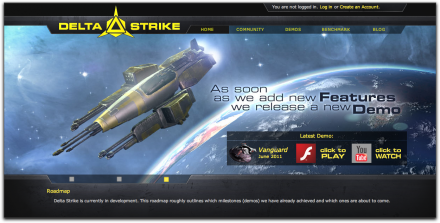
Sample Project

If you haven’t setup your SDK for AIR 3.0 Beta2 and Flash Player 11 Beta2, you’ll need to do that. You may also get an SDK warning if you’re SDK has a different name. If you know you have you’re SDK setup up for AIR 3.0 and Flash Player 11, then go ahead and reassign the SDK to the one on your system. Learn more about SDK management here.

Video

I’ve created a quick video that goes through the process. You can watch it below. If you prefer text, that is included further down.

Setting Up Your Away 3d Library

Create Your Library Project

Before downloading the latest Away 3D source code, we need a place to put it.  Fire up FDT and create an empty project and name it ‘away3D’. Once that’s done, select an SDK that has been prepped with the latest Flash Platform releases (see a previous blog post about it).

One that is done, go ahead and delete all the folders in the project.  Since this is just going to be used for reference, we don’t need any of those folders – just somewhere to place our source code.
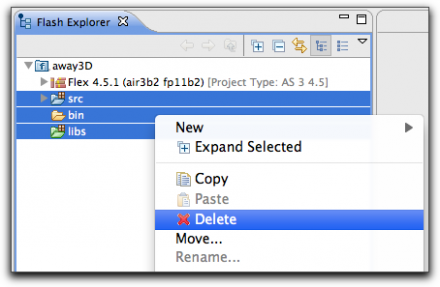
Download Away3D 4.0

If you have a github account and use OSX, using the Github OSX client is a great way to make sure you always have the latest Away 3D library. Do this by navigating to the Away 3D repository and choosing ‘Clone in Mac’. When the Github client opens, navigate to your ‘away3D’ project and download it to there.
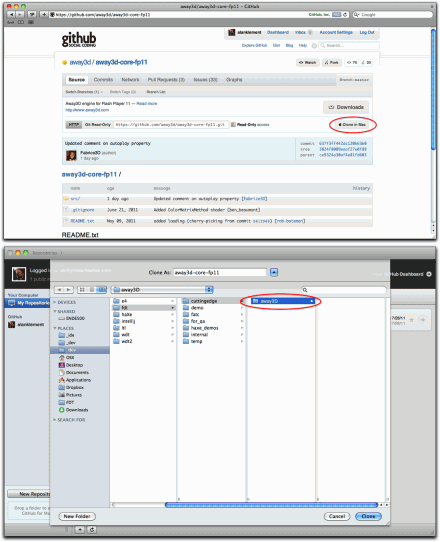
For windows users or anyone who isn’t interested in using the OSX Github client can either use the command line to download the library, or simply download the library as a .zip.

Setup Your Away3D Library Project

Once you have the away3D library in your project, add the nested ‘src’ folder as a source folder to your project. Once this is done, let’s go ahead and turn off errors for this project. Do this by navigating to your project’s settings and uncheck ‘Generate Problems / Tasks’. This will help keep things more tidy as FDT will not worry about checking this project for warnings or errors.
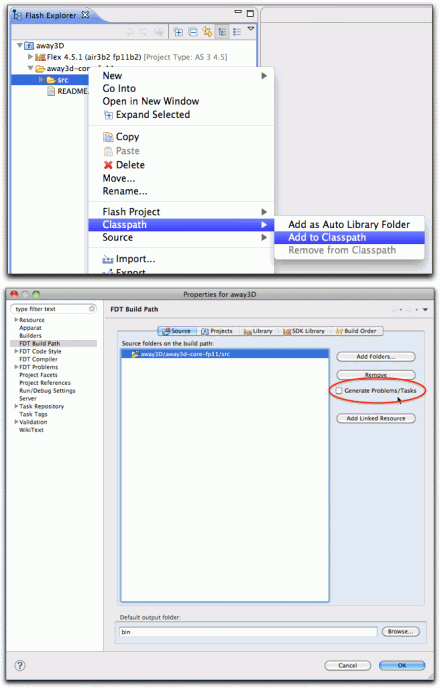
Now your library project is setup.

Import and Run The Sample Project

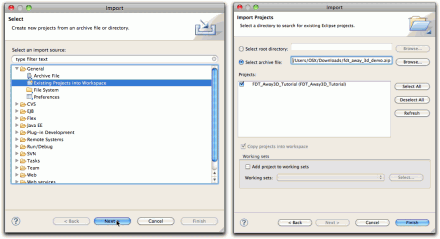
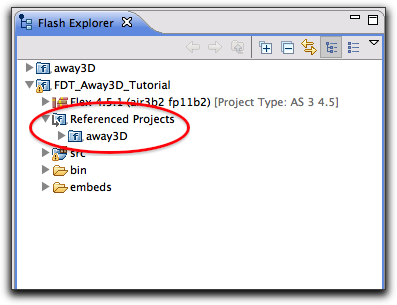
Next, simply import the project into your workspace (see this wiki article on how to do that). With the project open you should see that it is already looking for a project named ‘away3D’.
If you have named your Away3D library project with a different name, link to that instead (again see our Project References wiki article on how to do that).

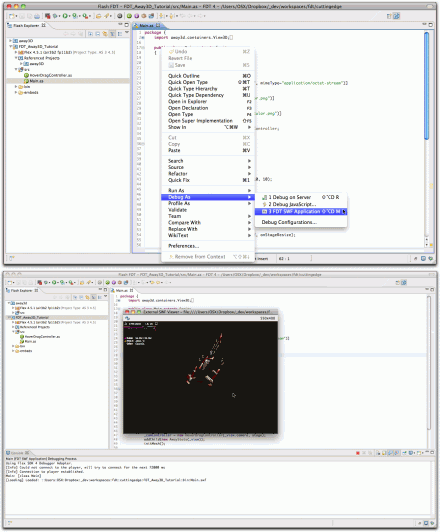
To run this project simply open the Main.as file, right click on the file on the Editor and choose Debug As>FDT SWF Application. FDT will take a second to compile (the first compile will take a few seconds) and then the application will run.
Analyzing The Setup

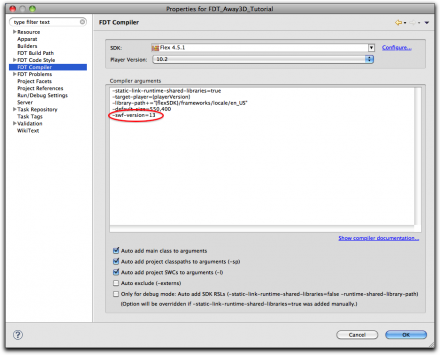
There are a few important notes when working with Away3d 4.0 and the latest SDKs. You’ll first have to download the latest beta SDKs, of course, but you need to make sure you have the proper compiler and embedding arguments. When targeting this new Flash Player, you’ll need to make sure you have the ‘-swf-version=13’ compiler argument.  If you’re using the sample project, it will already be added.
Another ‘gotcha’ is to make sure you’re properly embedded the .SWF into an HTML page. The trick here is the ‘params.wmode = “direct”;’ argument.
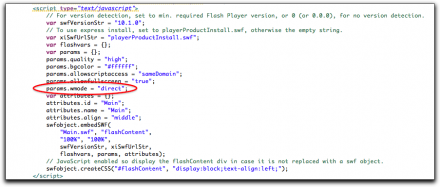
All the test is in the code, so check it out. You’ll see how the 3D model (a Wavefront .OBJ file) is embedded into your application, and then skinned and lit.  It’s surprisingly easy. Enjoy

Get FDT5