Up

Share your Content with the FDT Community

You want to join the FDT community? That’s easy, simply send us your news and be part of the FDT community page

[contact-form-7 id=”6383″ title=”Take Part”]

Linux builds have been tested on Ubuntu but should run on other distributions too.

With the download of FDT you accept our EULA

Featured

FDT Views/Editors follow Dark Theme

With this release FDT can easily switched to dark theme:Simply select the Dark theme and apply. The Dark theme is available since Eclipse 4.4 (Luna). Older versions of Eclipse (and FDT) does not support color themes of this form. The FDT views and editors will switch to their default dark color set: In case you […]

by FDT Team

FDT Newsletter

Subscribe to our FDT mailing list and get the latest news and vouchers! * indicates required Email Address * First Name Last Name

by FDT Team

FDT Milestone 10 – 10 years anniversary

We‘re happy to announce FDT Milestone 10! It‘s been 10 years since our first FDT release and a lot happened since last years Milestone 9. We went on to improve FDT and your IDE experience. Here is a list with our new key features: Ant Project Generator Dump launch configuration Library Project Template ActionScript refactorings […]

by FDT Team

Library Project Template

This new FDT release contains features to support a more fluent development of SWC libraries. The primary starting point to develop a library is the new Library Project Template for AIR or Web: This template creates an empty library project containing two source folders: All compilation units to include into the library should be placed […]

by FDT Team

Release 9.9 – Project groups

With this release the FDT Explorer can present projects in groups: Each Project Group is a set of workspace projects (i.e.: Working Set). Each project can be a member of one group and can not be shared among groups. Project Groups are logical structures shown inside FDT Explorer. Neither they represent nor they change the […]

by FDT Team

FDT 4 Milestone 3 "Flex 4 Support" released

June 30, 2010 by Michael Plank

Live Presentation

The FDT team is proud to announce the release of FDT 4 Milestone 3. This milestone release is dedicated to Flex 4 and includes support for the new MXML 2009 language features like Spark, FXG, States and the new language tags.

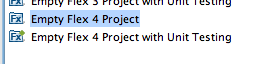
Flex 4 Project Types and Templates

In milestone 2 we’ve introduced the new SDK and project management which features project types, project templates and a simplified SDK management. In M3 we could leverage this new system and simply add the new project types and templates for Flex 4. We are also shipping the Flex 4 SDK and adding it to your installed SDKs automatically.

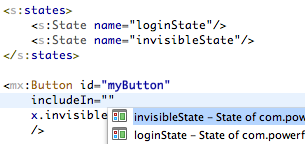
Flex 4 States

Flex 4 introduced a nice new way to define and use states in your MXML view classes. FDT 4 M3 fully supports this new concept and offers autocompletion, occurrence marking as well as rename refactoring for states.

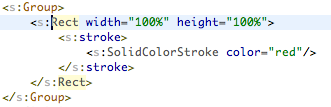
FXG Support

Make use of the new FXG declarative graphics format either by using external .fxg files or directly inside your MXML classes.

New Language Tags

Use the new MXML 2009 language tags like “Declarations”, “Definition”, “Library”, “Reparent” etc.

Download

Existing FDT4 users: If you have FDT4 already you can get the latest update from the Eclipse menu item Help->Check for Updates
New FDT4 users: If new to FDT4, you can download the M3 standalone installer here for a 30 dyas trial.
Current FDT3 users: If you hold a FDT 3 license already, either Pure, Professional or Enterprise, you can run full FDT4 Beta features until released. Enjoy!
New FDT 3.5 users: If you bought FDT 3.5 after 25 January 2010 FDT 4 is free for you!
  • Existing FDT4 users: If you have FDT4 already you can get the latest update from the Eclipse menu item Help->Check for Updates
  • New FDT4 users: If new to FDT4, you can download the M3 standalone installer here for a 30 dyas trial.
  • Current FDT3 users: If you hold a FDT 3 license already, either Pure, Professional or Enterprise, you can run full FDT4 Beta features until released. Enjoy!
  • New FDT 3.5 users: If you bought FDT 3.5 after 25 January 2010 FDT 4 is free for you!

Notes

If you have installed FDT 4 M2, please delete the FDT folder located in the users directory. We’ve made small changes to the project type and template XML files. FDT will copy the new files automatically after you’ve deleted the FDT folder.

FDT Community Contest

June 26, 2010 by Carlo Matic

We are excited to have FITC coming to our hometown San Francisco and have decided to share a ticket with you !

Make a video or blog showing your workflow in FDT4 – upload it to YouTube, Vimeo or your favorite video sharing service, to be entered into a contest for a free conference ticket (and some more nice surprises to be announced!)

Instructions:

  1. Grab FDT4 (www.fdt4comfort.com)
  2. Get your video camera or setup your computer to capture the screen or start writing!
  3. Post your video/content mentioning what you like about FDT4, a screencast of your favor feature, workflow or tutorial.
  4. Tag it with: “I♥FDT
  5. And let the world know!


The winner will be selected based on the combination of:

  1. Most views
  2. Production quality
  3. Overall usefulness of the video (shows tips, teaches us something etc..)
  4. Creativity

Videos should be screen recordings 1 – 5 minutes in length.

Tips/Ideas: How about showing off the new Profiler, or the Project Templates, haXe, Flex4 support, Linux or one of the FDT plug-ins ?

Winners will be announced August 7th, 2010 on this Blog and on Twitter.

See you in San Francisco !

GOOD LUCK!

The FDT Team

FDT 4 Milestone 3 Live Demo

June 25, 2010 by Carlo Matic

Dear FDT Community!

The FDT team is proud to show you the release of FDT4 Milestone 3 live.

WATCH RELEASE PREVIEW LIVE ON USTREAM
Tuesday, June 29, 2010 at 9:00 AM (PST)

This milestone release is dedicated to Flex 4 and includes support for the new MXML 2009 language features like Spark, FXG, States and the new language tags.
(more…)

FDT Video Tweet #4 – Unique Features

June 17, 2010 by Michael Plank

Another video tweet showing some of the unique features in FDT like live error highlighting, advanced code completion, quick fixes, code templates and navigation features.

Cheers,
@Michael_Plank

_

FDT SDK Plugins announced!

June 1, 2010 by Michael Plank

We are very pleased to announce the “FDT SDK Plugins Program” – extend FDT with the features you ever wanted to have in your favourite Flash and Flex IDE yourself.

To get started, we’ve decided to write this post in Q&A style, with some of the main first questions, however I’m sure there will be more coming from you 🙂

Let’s get rolling !

Q: What is this SDK about?
A: Many developers have been asking how to implement their own FDT plugin. They would like to add framework supporting features, new helpful views, add their own Error/Warning markers or Autocompletions and Quick Fixes. With the FDT SDK plugins, we’d like to show you how to get started building your own FDT plugins and share them with the community.

Q: Is it hard to build a FDT plugin?
A:
Depends on the feature you have in mind. In general it’s very easy to build FDT plugins using the Eclipse RCP technology.

Q: How do I learn writing Eclipse FDT plugins?
A:
Our approach is to document the extension points of FDT and provide examples on how to write your own plugins and use these extension points. You will learn from other plugins, from our upcoming tutorial series and by getting in touch with us. We would love to work together with you guys turning your great ideas into reality.

Q: What programming language do I need to use?
A:
Java

Q: Are there any FDT Plugins already available?
A:
Yes, thanks to Maxim Zaks and his Pflection plugin, we are happy to present the first open source FDT community plugin. It’s a code metrics plugin displaying statistics about your Flash/Flex projects source code.

Q: Where can I download and install FDT plugins?
A:
We will host a central plugin repository. This is the Eclipse update site: http://fdt.powerflasher.com/plugins
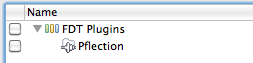
In FDT 4 M2 we have preinstalled this update site. If you don’t find it in your FDT instance just go to Help > Install new software and add the update site URL mentioned above. Select the plugins you want to install and click “Finish”, that’s it. Try it now and install the Pflection plugin right away.

Q: FDT 3 or FDT 4?
A:
The upcoming tutorials will all target FDT 4. Most of the plugins will work in FDT 3 as well. It’s up to the plugin developer to document the requirements of his plugin.

Stop answering questions, I’d like to get started!

Great, we will start with the first tutorial: “Your first FDT plugin”! It consists of 3 parts and will guide you through the steps of building your first FDT plugin that extends FDT with Editor Templates:

  1. Setting up the development environment
  2. Developing the plugin
  3. Deploying your plugin

I’m looking forward to your feedback, ideas, questions, thoughts and of course your plugins!

@Michael_Plank and the FDT Team

Get FDT5