Up

Share your Content with the FDT Community

You want to join the FDT community? That’s easy, simply send us your news and be part of the FDT community page

[contact-form-7 id=”6383″ title=”Take Part”]

Linux builds have been tested on Ubuntu but should run on other distributions too.

With the download of FDT you accept our EULA

Featured

FDT Views/Editors follow Dark Theme

With this release FDT can easily switched to dark theme:Simply select the Dark theme and apply. The Dark theme is available since Eclipse 4.4 (Luna). Older versions of Eclipse (and FDT) does not support color themes of this form. The FDT views and editors will switch to their default dark color set: In case you […]

by FDT Team

FDT Newsletter

Subscribe to our FDT mailing list and get the latest news and vouchers! * indicates required Email Address * First Name Last Name

by FDT Team

FDT Milestone 10 – 10 years anniversary

We‘re happy to announce FDT Milestone 10! It‘s been 10 years since our first FDT release and a lot happened since last years Milestone 9. We went on to improve FDT and your IDE experience. Here is a list with our new key features: Ant Project Generator Dump launch configuration Library Project Template ActionScript refactorings […]

by FDT Team

Library Project Template

This new FDT release contains features to support a more fluent development of SWC libraries. The primary starting point to develop a library is the new Library Project Template for AIR or Web: This template creates an empty library project containing two source folders: All compilation units to include into the library should be placed […]

by FDT Team

Release 9.9 – Project groups

With this release the FDT Explorer can present projects in groups: Each Project Group is a set of workspace projects (i.e.: Working Set). Each project can be a member of one group and can not be shared among groups. Project Groups are logical structures shown inside FDT Explorer. Neither they represent nor they change the […]

by FDT Team

Release Notes FDT 4 Milestone 4

August 16, 2010 by Carlo Matic

Compilation Improvements and new AS3 Formatter Compile your Flash/Flex/AIR projects way faster now and chain up launch configurations for complex build processes. The new AS3 Formatter gives you even more settings to configure your code style.

  • Faster Compilation

By using the Flex Compiler API instead of FCSH/MXMLC compile speed of both full and incremental build has increased tremendously.

  • Less Memory Consumption

By getting rid of FCSH memory consumption was also reduced dramatically especially in bigger projects with multiple modules.

  • Launcher Chains

The new tab “Launcher Chain” in the FDT launch configurations makes it possible to chain up launch configs of any type as well as ANT targets in any desired order. This makes it very easy to setup complex build processes.

  • New AS3 Formatter

Even more options in the AS3 Formatter settings to configure your code style.

  • Use Embed source paths relative to the src folder 
  • Compile progress shown in FDT Progress panel 
  • Launch Configurations are saved in the project by default
  • Button next to Run/Debug to reset all active compiler instances
  • Flex Compiler API is also used in FDT ANT tasks
  • Flex SDK version compatibility restrictions deactivated

Known Issues

    <fdt.startDebugger/> ANT task broken

Note:

    If you’ve changed the default project types and templates, FDT will reset them after updating.

Download

  • Existing FDT4 users: If you have FDT4 already you can get the latest update from the Eclipse menu item Help->Check for Updates
  • New FDT4 users: If new to FDT4, you can download the latest milestone standalone installer here for a 30 days trial.
  • Current FDT3 users: If you hold a FDT 3 license already, either Pure, Professional or Enterprise, you can run full FDT4 Beta features until released. Enjoy!
  • New FDT 3.5 users: If you bought FDT 3.5 after 25 January 2010 FDT 4 is free for you!

Additional improvements or bug fixes in M4: bugs.powerflasher.com

Fixed Bugs

[FDT-817] – Nesting try-catch blocks render false errors for the error instance

[FDT-825] – Back References has duplicate items in Profiler

[FDT-858] – missing error warning at missing space in code

[FDT-872] – Function file import statements do not get fixed during refactoring

[FDT-881] – Launch configuration for swc library doesn’t use -external-library-path

[FDT-918] – Vector class not imported when targeting Flash 10

[FDT-921] – Missing Autocomplection after newline seprated dot.

[FDT-928] – Exporting AIR release build uses wrong Flex SDK.

[FDT-933] – Highlighting matching bracket is flickering, when making a selection by cursor keys

[FDT-940] – Problem using post-compile Ant task inside an AS3 launch profile

[FDT-990] – Init outline throws error when closing editor

[FDT-1033] – FDT Library Launcher must remove -is compiler arg when using manifest.xml

[FDT-1042] – compilation flex sdk 4.1

[FDT-1065] – Nullpointer exception when choosing “auto addd RSLS on debug” during launch

[FDT-1069] – AIR Application release broken

[FDT-1072] – Create AIR Certificate has no function anymore

[FDT-1073] – Compiler Arguments auto add carriage returns inbetween arguments

[FDT-1077] – Launching with SDK > 3.5 invokes no viewer. Halts on fcsh complete.

[FDT-1079] – FDT does not compile, after Exception is thrown

[FDT-1086] – Exception while opening project – restart of eclipse needed

[FDT-1114] – Fix Shortcut for Rename refactoring

[FDT-1115] – Automaticly fix library path of old launchers

[FDT-1116] – Organize Import always adds blank line after last import

Improvement
[FDT-124] – Add “Check All” button in Formatter preferences
[FDT-879] – ANT task for FDT Profiler
[FDT-919] – Cannot add Linked Libraries via FDT Build Path Preferences
[FDT-988] – Icons for new features in FDT 4
[FDT-1081] – Tracing a variable by typing its name with or without “;”
[FDT-1118] – Build time infos should not be red

Known Issues
Working on these issues now check our bugs.powerflasher.com

FDT 4 Milestone 3 Live Demo

June 25, 2010 by Carlo Matic

Dear FDT Community!

The FDT team is proud to show you the release of FDT4 Milestone 3 live.

WATCH RELEASE PREVIEW LIVE ON USTREAM
Tuesday, June 29, 2010 at 9:00 AM (PST)

This milestone release is dedicated to Flex 4 and includes support for the new MXML 2009 language features like Spark, FXG, States and the new language tags.
(more…)

FDT 4.0 M2 "Making Things Easier" released

May 10, 2010 by Michael Plank
After the successful release of FDT 4.0 M1 including a state of the art Profiler, the team is proud to announce the release of FDT 4 Milestone 2. When we asked the community which new features they want to see in the next major version of FDT the majority answerd with: „Make things easier“. All features and improvements of Milestone 2 are dedicated to this request.
The main new features are a completely reworked Flex SDK management, and a brand new project management including project types and project templates.

After the successful release of FDT 4.0 M1 including a state of the art Profiler, the team is proud to announce the release of FDT 4 Milestone 2. When we asked the community which new features they want to see in the next major version of FDT the majority answerd with: „Make Things Easier“. All features and improvements of Milestone 2 are dedicated to this request.
The main new features are a completely reworked Flex SDK management and a brand new project management including project types and project templates.

New Flex SDK management

The core library system of FDT 3 has been completely removed and replaced by an easy to use SDK management. The confusing core library variables like Flex_SDK_0_Pure or Flex_SDK_0_for_FP10 are finally history. You will not find them any more in M2.

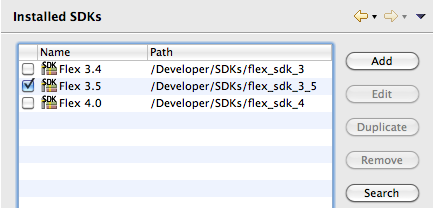
Managing your SDKs like adding, removing, duplicating or editing Flex SDKs of any version is amazingly easy now.

Adding an additional Flex SDK is now as simple as clicking the Add button and selecting a folder. FDT scans the SDK folder and displays detailed information on version number and included SWC libraries.

Nice right? But we made it even easier. Add multiple Flex SDKs with just one click by using the Search functionality! FDT will search for available SDKs on your hard disc and will automatically add them.

New project management

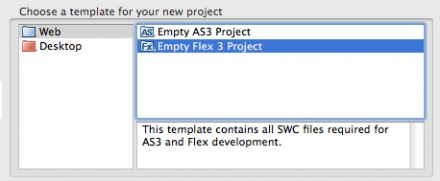
Milestone 2 introduces project templates as well as project types. Creating a new Flash project will now open up the brand new project creation wizard.


Just select a template from any category and FDT will create a new project based on the selected template. M2 ships with some predefined templates but you can create your own templates as well. You can incorporate source folders, an icon, files and folders, packages with classes and SWCs that should automatically be added to the classpath to your template. Check out this tutorial on how to create your own templates.

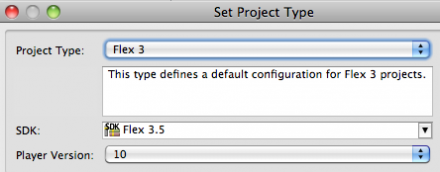
FDT 4 M2 also brings the concept of project types into use e.g. „Flex 3 Project“ or „AS3 AIR Project“. A project type defines the basic setup of a project like linked Flex SDK SWCs, available viewers and compiler arguments. Same as templates, project types are defined in XML format and can be edited or added by the user. The project type can be changed at all time for example from a Flex 3 project to a Flex 3 AIR project.

Project settings

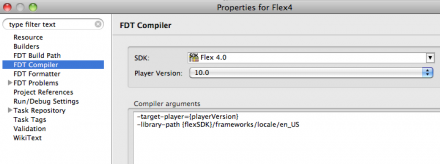
Compiler settings can now be edited in the project properties.


Launch configurations now use the settings from the project properties by default. You can still override these settings in the launch config.

The Flex SDK and target Flash Player version can easily be changed.

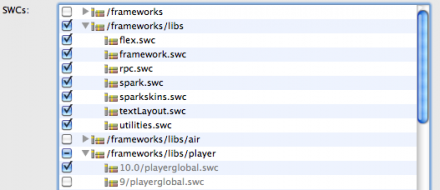
In the project build path settings you will now find a new tab called „SDK library“. Here you can add and remove Flex SDK SWCs by just selecting/deselecting them.


User wide preferences

The new settings for installed Flex SDKs, project templates and project types are now stored in the user directory. This implicates that these configurations are available across multiple workspaces!

We strongly believe that putting more and more settings to the user folder is the right way to go. It would put an end to setting up all FDT preferences whenever you create a new workspace. Feedback to this decision is highly appreciated!

Migration from FDT 3 to FDT 4

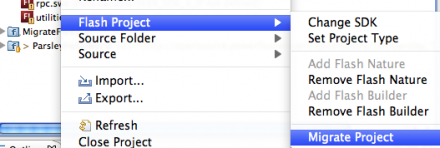
FDT 4 M2 uses new project setting files (invisible .files). Therefore an old project created with FDT 3 needs to be migrated to a FDT 4 project. Justright click the old project and select Flash Project > Migrate Project. This feature adds the new project files based on the old settings. After migrating to a FDT 4 project you can still work on it in FDT 3.

Links

Happy coding,
Michael

FDT 4 – Milestone 1 Release

February 21, 2010 by Carlo Matic

No, this is not a typo. Shortly after the great and successful release of FDT 3.5 we want to present our next major development step of FDT: FDT 4 “Milestone 1”! We are very excited about this release, this is going to be the best FDT release in history! (more…)

FDT 3.5 Beta 2 released

December 17, 2009 by Michael Plank

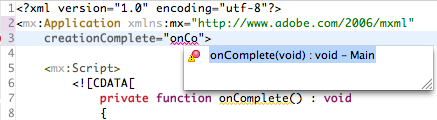
FDT 3.5 Beta 2 introduces full Autocompletion support for the MXML Editor. Use your favorite shortcut CTRL + Space everywhere in the MXML Editor like in CDATA scripts, in quotes or curly braces of MXML tags to auto complete AS3 code.

The FDT Search now also finds search terms in your MXML files and will display them properly in the search view. In addition we have added wizards for creating Top Level Variables and Functions and a lot new Code Templates for Metadata Tags, Flex Lifecycle methods, Vector.<> and so forth. Take a look at the list of new features introduced in Beta 2 and Beta 1 here.

This is the last beta update before we will release the final version of FDT 3.5 currently planned for January.

Your support is highly appreciated. If you find any bugs or have any feature requests, please report them at bugs.powerflasher.com

Update FDT now to 3.5 Beta 2 or download the standalone Beta Version:

Beta update site: http://fdt.powerflasher.com/update_beta/

FDT 3.5 Enterprise [Mac Cocoa] [Mac Carbon] [Win]
FDT 3.5 Professional [Mac Cocoa] [Mac Carbon] [Win]
FDT 3.5 Pure [Mac Cocoa] [Mac Carbon] [Win]

Happy coding everybody,
Michael

FDT tamed the Snow Leopard

September 14, 2009 by Carlo Matic


With the recent release of Apples new operating system “Snow Leopard” many applications had problems running on it. Our development team put a lot of effort to solve these problems for FDT in a very short time. Taming such dangerous animals usually takes months, but our developers knew how to grab this beast at its tail, and were very quick ;).
(more…)

Release of FDT 3.5 Public Beta 1

August 27, 2009 by Michael Plank

With version 3.5 of FDT we are introducing a set of great new features for both MXML and ActionScript editing. While we are focused on bringing you the best MXML editor for Flex development now, we are still continually improving FDT.

There will be two beta testing periods before we will do the final release. The first period, FDT 3.5 Beta 1 starts today! Public beta release for FDT 3.5 Beta 2 is scheduled for the next weeks. You can take a look at the roadmap, screenshots and videos of the new features here:

Features of 3.5 Beta 1

  • Autocompletion for MXML Tags
  • Autocompletion for event types
  • Improved Quick Outline
  • Autocompletion for constant convention
  • Semantic Highlighting and Autocompletion for inline XML New Quick Fixes Rewritten Debugger integration with new features

Features or 3.5 Beta 2

  • Autocompletion for ActionScript in MXML files Search and Find References in MXML files

Download links:

FDT Standalone
Eclipse update site: http://fdt.powerflasher.com/update_beta


We highly appreciate your opinion, and the feedback we receive will allow us to closely monitor and improve our product. Please post your bug reports at http://bugs.powerflasher.com or send us thoughts and ideas via email. You can also use the forum or Twitter to get in touch with us.

Cheers,
Michael

FDT 3.2 MXML Release-Party at 13 March 2009

February 2, 2009 by Carlo Matic

Hi folks,

we talked a lot about it, you asked a lot about it, the topic feels like it´s creating buzz for more than a year already. And now, we are finally there:

The first of the two next MXML Release versions (3.2 and 3.3.) is gonna be revealed to the public at March, 13th! You now have a few options of how you can attend this:

First option (best):

We are throwing a party!! Location to be confirmed, but it´s likely happening in Cologne. Visit us, have a beer on us, and see what is inside. Chat with the developers of Powerflasher, meet the whole team and party with us into the MXML-FDT-ERA!!

Second option (second best):

If you can not be there, no worries, we will send our live stream into the world. A link will be published soon, so that you can drink your beer at home, but still be “with us”. Or you want to throw your own little release-party at this date with your friends. The first parties are already organised. Our guys in Singapore are already on board. If you want to party a little with us, let us know!!

Third option (still good):

update your FDT version from our beta site and just see what we have to offer…

Hope to see some of you on March, 13th!!

cheers,

Frank

Creating Flash Player 10 Projects with FDT (beta)

October 30, 2008 by Michael Plank

We’ve recently released a beta update of FDT (v. 3.1.1. Build 1017) which fully supports Flash Player 10 projects and the new Vector.<Type> Syntax.

Here are the few steps you need to follow, in order to create Flash Player 10 content.

Installation

Requirements: installed Version of FDT 3.1

1. Install the beta update:

  • Help > Software Updates > Find and Install > Search for new Features to install > new Remote Site > URL: http://fdt.powerflasher.com/update_beta/

2. Download Flex SDK 3.2 or Flex SDK 4

3. Add the downloaded SDK to your List of Core Libraries

  • Window > Preferences > FDT > Core Libraries > AS3 Core Libraries
  • Click Add…
  • Type: Pure AS3 (Flex3) for FP 10, Name: AS3_FP10_beta
  • Click “Browse”
  • Click “New”
  • Name: FlexSDK_FP10_beta
  • Click “Folder” and select the downloaded and decompressed Flex SDK folder.
  • Click “OK” three times.

4. Install Flash Player 10

Project Setup and Compilation

  1. Create a new Flash Project in FDT and select AS3_FP10_beta in the Project Language section.
  2. Create a new Class and derive it from Sprite
  3. Insert the following line of Code to use the new Vector Class:
    var v : Vector.<int> = new Vector.<int>();
  4. Right click the Class and go to Run as > FDT AS3 Application

If you have used the Flex SDK 4, everything should work fine.

If you have used the Flex SDK 3.2 you will get a Compile Error. This is because the Flex SDK 3.2 compiles SWFs for Flash Player 9 by default.
If you take a look at the flex config file:
flex_sdk_3.2.0.3794/frameworks/flex-config.xml you can see, that it uses Flash Player 9 as target player <target-player>9.0.124</target-player>.

In order to compile for Flash Player 10 with SDK 3.2 you need to add the following compiler argument in your launch configuration: -target-player=10.0.0

The flex-config.xml of the Flex SDK 4 uses Flash Player 10 as target player, so you don’t have to add this compiler argument.

Vector Code Template

Try to add the following FDT Code Template (Window > Preferences > FDT > Editor > Templates)

var ${name} : Vector.<${type}> = new Vector.<${type}>();${cursor}

to quickly create new variables of type Vector.

Have fun!
Michael Plank

Release beta of FDT 3.0 Enterprise

February 29, 2008 by Carlo Matic

We just uploaded a first test version of FDT 3.0 Enterprise. You can download the pre release version from the update site “http://fdt.powerflasher.com/update_beta/”. The two most important new features are refactoring and debugging.

  • To debug you can set breakpoints (double click at the left side of the editor) and start your application with “Debug as…->FDT AS3 Application”). Please consider that all SWFs you use need to be debugable (if you use multiple SWFs make sure all are compiled with “-debug=true”). You can watch the stack trace and variables, step into/over/out (F5/F6/F7) and even can modify primitive variable values at runtime. If you hover over a variable inside the editor of the current stack element, the value of this variable is shown. You can even format this output using special templates (in the preferences under “FDT->Run/Debug->Reference Types”). There are some predefined templates at the moment, expect more to come (we take suggestions seriously!). Of course you can define your own templates.
  • The implemented refactorings are: “Rename top level type”, “Rename method”, “Rename variable”, “Rename package” and “Move type”. You can drag and drop classes/interfaces in the flash explorer and all references (such as imports) are updated automatically. The most important hotkey is <alt>+<shift>+R to rename the element under the cursor. If you place it over a variable name the variable would be renamed, over a type name and the type would be renamed and so on. With <alt>+<shift>+V you can move a selected top level type to a new location.

Please also consider that you can only test the enterprise features if you do not enter a key for basic or professional. If you already use FDT we would suggest to install the beta in different eclipse installation to try out the new features.

We wish pure coding comfort!

Get FDT5