Up

Share your Content with the FDT Community

You want to join the FDT community? That’s easy, simply send us your news and be part of the FDT community page

[contact-form-7 id=”6383″ title=”Take Part”]

Linux builds have been tested on Ubuntu but should run on other distributions too.

With the download of FDT you accept our EULA

Featured

FDT Views/Editors follow Dark Theme

With this release FDT can easily switched to dark theme:Simply select the Dark theme and apply. The Dark theme is available since Eclipse 4.4 (Luna). Older versions of Eclipse (and FDT) does not support color themes of this form. The FDT views and editors will switch to their default dark color set: In case you […]

by FDT Team

FDT Newsletter

Subscribe to our FDT mailing list and get the latest news and vouchers! * indicates required Email Address * First Name Last Name

by FDT Team

FDT Milestone 10 – 10 years anniversary

We‘re happy to announce FDT Milestone 10! It‘s been 10 years since our first FDT release and a lot happened since last years Milestone 9. We went on to improve FDT and your IDE experience. Here is a list with our new key features: Ant Project Generator Dump launch configuration Library Project Template ActionScript refactorings […]

by FDT Team

Library Project Template

This new FDT release contains features to support a more fluent development of SWC libraries. The primary starting point to develop a library is the new Library Project Template for AIR or Web: This template creates an empty library project containing two source folders: All compilation units to include into the library should be placed […]

by FDT Team

Release 9.9 – Project groups

With this release the FDT Explorer can present projects in groups: Each Project Group is a set of workspace projects (i.e.: Working Set). Each project can be a member of one group and can not be shared among groups. Project Groups are logical structures shown inside FDT Explorer. Neither they represent nor they change the […]

by FDT Team

Flashtent

November 14, 2011 by Carlo Matic

We’d like to call attention to a great free Flashevent on Dec. 4, 2011:

Flashtent is a livestreaming event hosted by John Barrett (HFUG) and Ben Fhala (EverythingFlash) and will cover Mobile, 3D, AIR, Gaming, and HTML5. Speakers include Dee Sadler, David Gamez, Chris Griffith, James Wagstaff, as well as FDT’s Alan Klement.

Alan will give a talk on mobile and haXe development with FDT 5 and thereby show what the new FDT has become capable of. Don’t miss this easy and free opportunity to learn about state-of-the-art coding in FDT 5.

Announcing FDT haXe plug-in Public Beta supported by Influxis

May 12, 2011 by Carlo Matic

We are happy to announce the FDT haXe Beta plug-in as a public release as part of our contribution to the Flash Community Open Source program.

Developed in collaboration with Influxis, the FDT haXe plugin provides developers a powerful tool for authoring the haXe multi-platform language. Our goal is to provide the best haXe coding experience and that it feels like coding in the AS3 or MXML editor of FDT: same shortcuts, same syntax coloring, same coding comfort.

Here’s a feature overview:

  • Live error checking
  • Autocompletion (variables and functions)
  • Syntax coloring
  • Code editing features
  • Open Type
  • New Class/Interface/Enum wizards
  • HaXe Project Wizard

Here are additional built-in new features of the haXe plugin.

  • Setup an SWF output in your HXML. When it builds, right click on the SWF and select Run As > SWF File.
  • Setup a JS output. Right click on the generated JS file and select Run As > JavaScript in browser or Run As > Node.JS server (NB: needs Node.JS installed, and the project needs to include the haxe/node library from bdog-node on github).
  • Compile haxe to C++. Right click on the generated executable and select Run As > Native Executable (you have to do “haxelib setup ; haxelib install hxcpp” for this to work).
  • Compile to Neko. Right click on the generated neko file and select Run As > Neko VM

More information on the FDT Documentation website.

Some of you might be wondering … What is haXe ?

haXe is an independent multiplatform open source programming language. haXe can publish the same project to Flash, Javascript, PHP, C++, Neko, and in the future it will support more tagets such as Java and C#. haXe helps to leverage the best performance and best features for each platform.

Writing code in haXe is similar to writing Actionscript. Additionally, you could write an application or game that targets Javascript and HTML5 Canvas, or you could leverage server side targets like PHP or Neko so that you can share your classes on both the front-end and back-end. Thanks to haXe you can create an application that runs, for example, on Facebook and runs on an iPad or TouchPad.

The haXe code is MIT licensed, there are no licensing fees or limitations. Most importnat, haXe has a passionate open-source community behind, very willing to help and support developers.

You can find more information on haXe.org

So… what are you waiting for?

Install FDT’s haXe Plugin, just follow the instructions on our haXe FDT Installation tutorial.

More haXe news will be published soon, stay tuned! Follow @FDThaXe to keep up to date on latest development.

Happy Coding from the FDT and Influxis Team!

P.S. Big kudos to Powerflasher’s design team creating haXe new logo! Let us know how you like it.
New documentation and blog redesign

September 24, 2010 by Carlo Matic

With the new FDT 4, we have also moved the documentation into a wiki. A wiki is much a more convenient way to learn and look up things than a bunch of PDF files. It is not complete yet, but Alan is doing a great job shoveling all the old docs into the wiki.

Also, you will have noticed that the blog design changed. Some might say: not for the better. 😉 However, our main intentions were (a) to unify the look’n’feel of the community ressources, and (b) to improve the readability of the blog by layout changes like more space and larger fonts.

All of this is work in progress. Now that the software is ready, we will put a lot of effort into the online ressources and the community infrastructure. After all, FDT is not just a bunch of ones and zeros, it lives by its users and the community (and what a community!).

FITC San Francisco 2010 round-up

September 1, 2010 by Carlo Matic

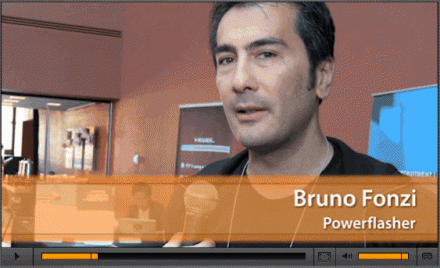
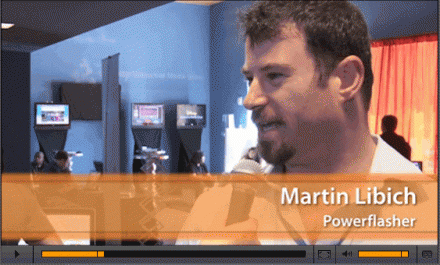
Attending the FITC festival in San Francisco, the Powerflasher team was interviewed by Adobe and featured in their EDGE website newsletter:

Bruno Fonzi: The impressive new thing is just seeing devices, having Flash working on devices.

Martin Libich:  Well, I think in the Flash world, in general, what we are seeing and this is crucial for what we do, is the possibility of taking Flash out of the browser. Using the flexibility of Flash to do what has been done on the web anywhere you want, in the store front, at the counter when you are ordering your latte.

The Conference

In this article, HTLM5 vs. Flash at a Flash Conference, Yosun Chang captured the openness and true interest in digital art design and technology that explores and goes beyond Flash. This is valid for FITC, FlashOnTheBeach (FOTB), FlashAndTheCity (FATC), FlashBelt and many other Community driven conferences around the world! So many hard to mention all, sorry !

Yosun has even missed however the presentation about haxe.org another alternative language to ActionScript or Flex ”Everything you wanted to know about haXe, but were afraid to ask”  with Nicolas Cannasse presented at the super cool Influxis Voodoo Lounge
We have also done some interviewed ourselves to some of the haXe fans attending FITC, including the number one fan Nicolas Cannasse 😉


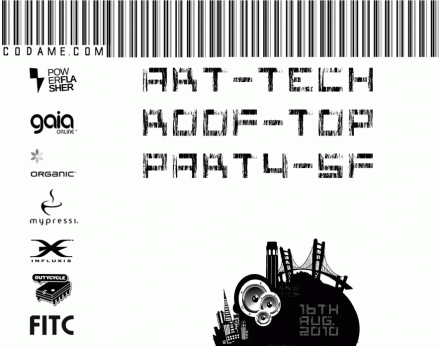
We also had a blast on the rooftop CODAME event, it could not have better a place for Powerflasher to celebrate our first year in USA as a Digital Interactive Development company. Looking forward to new upcoming exciting projects !

A special thanks to our supporters, Gaia Online, Organic, Mypressi and Influxis for the drinks!

I would like to thank @Starpause for helping us to organize the art tech side of the event with the help of @keisukes @andremichelle @radley @calebhaye @jamiew @EvanMorris transmote.com for making CODAME an awesome multimedia experience ! Buck & Sumit as great hosts of the now legendary San Francisco rooftop residence!

And big thanks to the fog for passing by and make the CODAME event a full San Francisco experience!

Check it out yourself in this Photo Gallery taken by @photonburst and video taken by @keisukes

FITC was definitely fun and informative, we were glad to see you in our new home, San Francisco, and hope to you here again next year !

@BrunoFonzi

Join the FDT Speakers Program!

July 26, 2010 by Carlo Matic


We’re on the lookout for speakers from around the globe to present on Flash/Flex, ActionScript, MXML or haXe topics. If you would like to join our network of speakers and be introduced to User Group leaders and event organizers in your region.

FAQ:

Q: What is the goal of the program?

A: More speakers doing more presentations at more regional events. We want to help connect  user group leaders and speakers, showcasing speakers and their areas of expertise and helping groups get the speakers and topics they want. We also want to work to increase the presentation skills of participating speakers and help provide resources and future speaking opportunities for them.

Q: What are the advantages of the FDT Speaker Program?

A: We realize that some speakers are already well-connected and may not need as much assistance in making connections. For them the program becomes a way to showcase their speaking activities as we add event history and group reviews to speaker profiles. We will help less-experienced speakers gain more community exposure and establish a track record for conference speaking events.

Q: Who can participate?

A: This is open to any speakers wishing to present on Flash/Flex, ActionScript, haXe and MXML topics.

Q: How does this compare with other speaker lists?

A: Our goal is to make this much more than just a list. Additional steps such as peer/group event ratings, speaker training opportunities, and additional speaking opportunities are all things we’re working towards.

Q: Who benefits?

A: User groups benefit by being able to find speakers in their “region” that they might not be aware of. Speakers benefit from increased exposure with the community and a way to share their willingness to speak on specific Flash/Flex topics. At the end of the day, we hope that the overall community benefits.

Q: How do I add to the list of topics?

A: Just send us an email request or simply fill the following

FDT haXe plugin public alpha version released

July 22, 2010 by Michael Plank

The community has been screaming for haXe support in FDT. We are thrilled today to announce the public alpha release of the FDT haXe plugin!

Developed in collaboration with Powerflasher and Influxis, the FDT haXe plugin provides developers a powerful tool for authoring the haXe multi-platform language. Our goal is to provide the best haXe coding experience and that it feels like coding in the AS2, AS3 or MXML editor of FDT: same shortcuts, same syntax coloring, same coding comfort.

Here’s a feature overview of the public alpha version:

  • Live error checking
  • Autocompletion (variables and functions)
  • Syntax coloring
  • Code editing features
  • Open Type
  • New Class/Interface/Enum wizards

You can follow our development progress on Twitter @FDThaXe

Watch the first live demo of the FDT haXe plugin I showed at Flash Camp Manchester in the recording from Adrian Parr starting at minute 38 here.

Getting started with the FDT haXe plugin (alpha version)

Installation

  1. Download the latest version of FDT4 Beta release here
  2. Go to http://haxe.org/download and download the installer for your OS.
  3. Run the installer.
  4. Start up FDT 4 and select Help > Install new Software
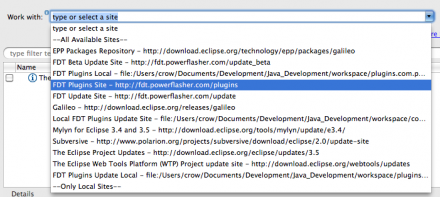
  5. Select the “FDT Plugins Site” update site. (If it is not included in your drop down menu, enter: http://fdt.powerflasher.com/plugins in the “Work with” text input and hit return)
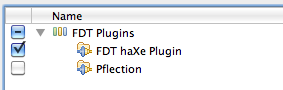
  6. Select “FDT haXe Plugin” from the plugin list, hit finish and follow the final installation steps.

Setting up the haXe Plugin

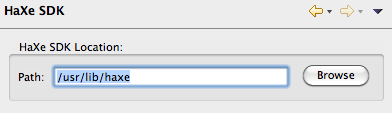
  1. First of all you need to configure the haXe SDK: Go to Preferences > haXe SDK and insert the haXe installation directory
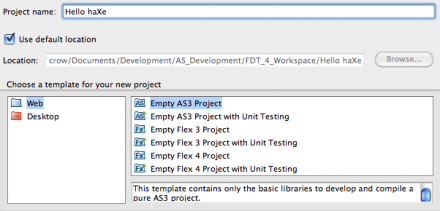
  2. Now create a new “Empty AS3 Project”, name it “Hello haXe” and click Finish
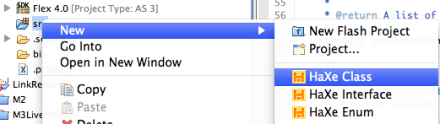
  3. Right click the src folder and select New > HaXe Class (if you don’t see it select Window > Reset Perspective from the Menu)
  4. Call the new Class “HelloHaxe” and click Finish
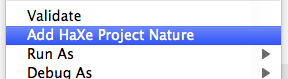
  5. Right click the Project and select “Add HaXe Project Nature”
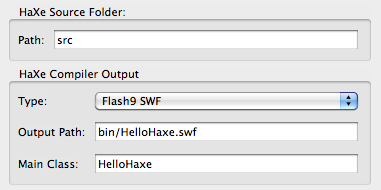
  6. Click Next and set the Type to “Flash9 SWF”, the output file to “bin/HelloHaxe.swf” and the Main Class to “HelloHaxe”
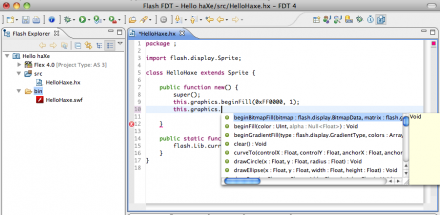
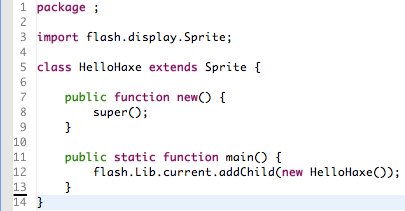
  7. Extend Sprite and add the constructor and the static main function. The final class should look like this:

That’s it, you’ve successfully set up your first FDT haXe Flash project!

Start Coding

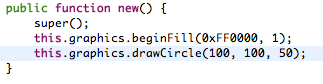
Start adding code in the constructor for example:

Please note, the SWF is compiled on every Save, no specific launch configuration is available yet. This is our first Alpha release, please bare with us !

For any feedback, feature requests, improvements, bugs and other issues we encourage you to use our community driven tracking website to make the haXe support in FDT the greatest ever.

We would also advice to subscribe to the haXe mailing list, it is a very active group with smart people and interesting topics.

On the behalf of the FDT Team and Influxis, I hope you are as excited as we are and enjoy the first available version of the FDT haXe plugin,

Michael Plank

FDT Workshop @FlashCampBrasil

January 4, 2010 by Carlo Matic

One more reason to be @FlashCampBrasil !

We are proud to announce a FDT Workshop with Gabriel Peart for this event.

Getting started with FDT, configurations, unique features, tips, tricks and there will be lots of surprises for you: t-shirts, free license, discounts …

The workshop will be January 16, the Flash Camp Brazil in the beautiful city of Maceió, Brazil.

This is definitely a Flash event to not be missed!

Time is running out, hurry up and register !

Be a part of it!

September 30, 2009 by Carlo Matic

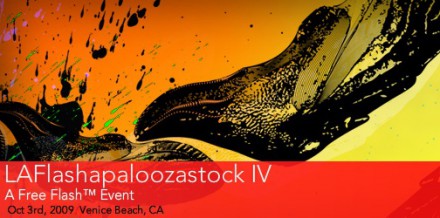
Powerflasher is sponsoring two community FITC events in Los Angeles: LAFlashapaloozastock IV Oct 3, 2009 in Venice Beach and Unconference @ MAX Oct 5-7, 2009!

Make sure to be part of it! Then, let the World know about the events and sessions you attended for a chance to win FDT.

Blog or tweet your thoughts, the Top comments will receive FDT licenses!

Details to follow…

Bruno Fonzi

Presenting at the FITC Unconference @ MAX

September 29, 2009 by Carlo Matic

If you happen to be at MAX in L.A. this year, make sure to meet us at the FITC Unconference room

Carlo‘s presentation this year is: “The shoemaker’s son always goes barefoot

Bruno is presenting together with Jesse Freeman on “The Ultimate Flash and Flex Development Environment

If you need one more reason to meet us at the FITC Unconference @ MAX, here’s another one for you: FREE BEER!

Yes, you read it right!

FREE BEER will be available for the entire three days of the event thanks to our Influxis friends.

Are you going to be there? Let us know !

Giving Back @ MAX

September 29, 2009 by Carlo Matic

If the ticket to Adobe Max has left you low on funds, here’s some good news. We are giving back to our highly supportive Flash community!

In the next few days we will announce some interesting and fun initiatives.

Follow this blog or on twitter

Stay tuned !

Get FDT5