Up

Share your Content with the FDT Community

You want to join the FDT community? That’s easy, simply send us your news and be part of the FDT community page

[contact-form-7 id=”6383″ title=”Take Part”]

Linux builds have been tested on Ubuntu but should run on other distributions too.

With the download of FDT you accept our EULA

Featured

FDT Views/Editors follow Dark Theme

With this release FDT can easily switched to dark theme:Simply select the Dark theme and apply. The Dark theme is available since Eclipse 4.4 (Luna). Older versions of Eclipse (and FDT) does not support color themes of this form. The FDT views and editors will switch to their default dark color set: In case you […]

by FDT Team

FDT Newsletter

Subscribe to our FDT mailing list and get the latest news and vouchers! * indicates required Email Address * First Name Last Name

by FDT Team

FDT Milestone 10 – 10 years anniversary

We‘re happy to announce FDT Milestone 10! It‘s been 10 years since our first FDT release and a lot happened since last years Milestone 9. We went on to improve FDT and your IDE experience. Here is a list with our new key features: Ant Project Generator Dump launch configuration Library Project Template ActionScript refactorings […]

by FDT Team

Library Project Template

This new FDT release contains features to support a more fluent development of SWC libraries. The primary starting point to develop a library is the new Library Project Template for AIR or Web: This template creates an empty library project containing two source folders: All compilation units to include into the library should be placed […]

by FDT Team

Release 9.9 – Project groups

With this release the FDT Explorer can present projects in groups: Each Project Group is a set of workspace projects (i.e.: Working Set). Each project can be a member of one group and can not be shared among groups. Project Groups are logical structures shown inside FDT Explorer. Neither they represent nor they change the […]

by FDT Team

How to install Subversive in Eclipse Juno with FDT

March 25, 2013 by Ain Tohvri

Since FDT can also be installed as a plugin on the latest Eclipse IDE, the FDT Team also looks ahead and tests against the latest Eclipse releases.

In Eclipse Juno the installation of the Subversive SVN plugin has changed a bit. The SVNKit/JavaHL selection screen no more appears right after the Subversive installation finishes so the SVN connectors need to be installed separately.

Following steps will help you to get Subversive going:

  • Install Subversive from the Juno update site http://download.eclipse.org/releases/juno
    You can find it under Collaboration > Subversive SVN Team Provider
  • Add Subversive Connector update site from Available Software Sites > Add…
    Define the Update site name of your liking and use http://community.polarion.com/projects/subversive/download/eclipse/3.0/update-site/ for the location.
  • Install Subversive SVN Connector by choosing the added Subversive SVN Connector update site, e.g. Subversive SVN Connectors > SVNKit 1.3.8 Implementaton (Optional).
    NB! If the SVN server you’re using runs SVN 1.7, make sure to select the respective SVNKit 1.7.x Implementation.

Useful references:

Feel free to add your experiences or ask your questions.


gotoAndSki(); Conference Switzerland

January 17, 2012 by Carlo Matic

All eyes on Stechelberg: from January 26th through 28th, 2012 (Thursday – Saturday) we want to recommend you the most adventurous Flash/Flex/Mobile conference. GotoAndSki(); is an event in the Swiss Alps hosted by Fernando Colaço and David Almeida. This unique combination of boarding/skiing/sledding and conference sessions guarantees the maximum fun in the dull month of January. You will be having fun in the snow during the day and learn in sessions after the slopes are closed. Speakers include Mihai Corlan, Hugo Fernandes, Eugene Zatepyakin, Mario Klingemann, Tom Krcha, Steven Peeters, Peter Elst, and Dominic Graefen. Michael Plank will be speaking as well, so you won’t need to cut back on chatting about FDT 🙂 .

Still not convinced? Have a look at the photographs from last year.
Tickets are still available.

FDT & AIR 2.7

June 14, 2011 by Carlo Matic

Most Flash developers are waiting for an official release of the AIR 2.7 SDK. Now it is available since the last minutes and you can grab it through the official download site.

But there’s just one step necessary to get the SDK running on your machine. We will show you, how to merge the AIR 2.7 SDK with your Flex SDK and get it running in FDT.

Windows
On Windows it is pretty easy. Just extract the zip file with an unzipper tool of your choice in the Flex root directory and overwrite all files.

Mac OS X
On Mac you can use the Terminal to extract the files. Here’s a quick step by step tutorial:

  1. Copy the downloaded AdobeAIRSDK.tbz2 file into your Flex root directory
  2. Open the terminal, cd to your Flex SDK and type
    tar jxvf AdobeAIRSDK.tbz2 (enter your password if necessary)

After you’ve finally merged both SDKs you can add it in your FDT via the settings popup FDT > Installed SDKs.

Don’t forget to publish with -swf-version=12

FDT 4.4 Release & FDT 4.5 Announcement

May 17, 2011 by Carlo Matic

We’re delighted to officially release FDT 4.4

This was possible thanks mainly to your feedback we received since our Beta release. You can now safely take advantage of the enormous Apparat benefits within FDT. As usual, bug fixes and improvements can be found in our Release Notes.

As part of our open culture initiative, we like to share with you some information on the next release FDT 4.5 we are currently working on.

First of all, we can assure you, FDT 4.5 will be another free update for all existing FDT customers!

FDT 4.5 main focus will be to suppor the new Flex 4.5 SDK, just recently officially released by Adobe, AIR creation workflow productivity improvements and support for mobile & devices.

We encourage everyone to continue sending us feedback, your input is extremely valuable to us.

We would also like to advice flash developers using of Apparat, to join the mailing list and consider contributing to the Apparat source code.

Stay tuned on this screen for more exciting news.

Happy Coding!

The FDT Team

Announcing FDT haXe plug-in Public Beta supported by Influxis

May 12, 2011 by Carlo Matic

We are happy to announce the FDT haXe Beta plug-in as a public release as part of our contribution to the Flash Community Open Source program.

Developed in collaboration with Influxis, the FDT haXe plugin provides developers a powerful tool for authoring the haXe multi-platform language. Our goal is to provide the best haXe coding experience and that it feels like coding in the AS3 or MXML editor of FDT: same shortcuts, same syntax coloring, same coding comfort.

Here’s a feature overview:

  • Live error checking
  • Autocompletion (variables and functions)
  • Syntax coloring
  • Code editing features
  • Open Type
  • New Class/Interface/Enum wizards
  • HaXe Project Wizard

Here are additional built-in new features of the haXe plugin.

  • Setup an SWF output in your HXML. When it builds, right click on the SWF and select Run As > SWF File.
  • Setup a JS output. Right click on the generated JS file and select Run As > JavaScript in browser or Run As > Node.JS server (NB: needs Node.JS installed, and the project needs to include the haxe/node library from bdog-node on github).
  • Compile haxe to C++. Right click on the generated executable and select Run As > Native Executable (you have to do “haxelib setup ; haxelib install hxcpp” for this to work).
  • Compile to Neko. Right click on the generated neko file and select Run As > Neko VM

More information on the FDT Documentation website.

Some of you might be wondering … What is haXe ?

haXe is an independent multiplatform open source programming language. haXe can publish the same project to Flash, Javascript, PHP, C++, Neko, and in the future it will support more tagets such as Java and C#. haXe helps to leverage the best performance and best features for each platform.

Writing code in haXe is similar to writing Actionscript. Additionally, you could write an application or game that targets Javascript and HTML5 Canvas, or you could leverage server side targets like PHP or Neko so that you can share your classes on both the front-end and back-end. Thanks to haXe you can create an application that runs, for example, on Facebook and runs on an iPad or TouchPad.

The haXe code is MIT licensed, there are no licensing fees or limitations. Most importnat, haXe has a passionate open-source community behind, very willing to help and support developers.

You can find more information on haXe.org

So… what are you waiting for?

Install FDT’s haXe Plugin, just follow the instructions on our haXe FDT Installation tutorial.

More haXe news will be published soon, stay tuned! Follow @FDThaXe to keep up to date on latest development.

Happy Coding from the FDT and Influxis Team!

P.S. Big kudos to Powerflasher’s design team creating haXe new logo! Let us know how you like it.

#FDT4FUN Winners!

April 16, 2011 by Carlo Matic
On a Friday, March 25th I asked on Twitter:

We had a lot of positive, creative and fun definitions of FDT, which made it very hard to choose one winner. Therefore we then posted the top 10 on our FDT Facebook Page for you to vote.

Also, considering the unexpected number of responses, we decided to declare three winners instead of only one. The three most voted answers are winning a FDT Pure license!

And the lucky ones …

N.1 @HelmEerieBlue with ‎”Fast Digital Technology”

‎N.2 @imarkahann with “First Divine Toolbox”

‎N.3 @suniljohn with “Fuel for Discerning Technophiles”

Congratulations to the winners! Please contact me @BrunoFonzi with your full name and email to receive the well deserved prize.

Thank you for your participation and as usual … happy coding!

Bruno

Powerflasher FDT4 Live Workshops

March 22, 2011 by Carlo Matic

This is a Monthly Event – Last Tuesday of every month: 9:00 AM to 10:00 AM (PT)

Join our next Live Broadcast FDT4 workshop. Register here to keep you informed on the latest activities.

During this session we’ll run a small workshop, you will learn how to use FDT or help getting started, while covering some of latest new features.

This is also an opportunity to discuss code and best practices developing multi-target applications in ActionScript, Flex or haXe for the Desktop, Mobile and Web.

The sessions will be contingent on the audience attending.
Tell us what we should cover when you
register.

If requested, we can also grab the latest FDT nightly build to show you some sneak peeks!

All you have to do is promise to keep your silence … but only if you really can!

Most of all, this is also a great opportunity to ask any question directly to the FDT team and give us feedback.

The session will be live on ustream.tv

On the behalf of the FDT Team, I wish you all Happy Coding.

Bruno Fonzi

Contact Bruno Fonzi @ Powerflasher for event and ticket information.

FDT 4 is released!!!

September 24, 2010 by Carlo Matic

Monday, September 27th 2010 you will be able to buy the new FDT 4 Pure, Plus or Max.

We are excited that FDT 4 is being considered the best Powerflasher release ever, and it’s thanks to you!

A bit of history

When Powerflasher was founded in 1997 as a digital interactive agency, many flash developers were missing a professional ActionScript code editor to build cutting edge software applications. In the year 2001 we decided to start building our own IDE based on Eclipse. The developers loved it and it spread like crazy. FDT 1.0 was born!

FDT 4 and the community

Starting in January 2010 with the release of FDT 3.5 we traveled the world to meet you at work, conferences (and of course some great parties). We openly shared the FDT 4 roadmap with you and, being big agile advocates, we made our internal iterations/sprints public free Milestones! We worked iteratively with you and we worked hard! Your contributions, constructive support, and great ideas were an integral part of the FDT 4 release and we think you’ll be pleased with the spectacular list of new features.

ActionScript 2 support

As Adobe is moving away from ActionScript 2, so is Powerflasher putting more effort into future languages as well. We however acknowledge there are still many projects developed in AS2, including some new exciting embedded devices applications. For this reason, we have decided to still offer FDT 3.5 with the full Enterprise features with AS2 support as an option for all FDT 4 customers for 99$

FDT Labs

In parallel to our milestones, we created the FDT labs, an open playground. We built the SDK  to empower you to create your own plug-ins and you did: The haXe (Beta) plug-in supported by Influxis and the FDT Code Metrix Pflection plug-in from iceX33. The Dependency Visualizer and Font Creator born from the labs playground as plug-ins are now core functionality of FDT 4!

We are committed in providing a cross-platform experience. We are very proud to have the opportunity to extend Linux support in our Labs with the help of the community.

New product names: Pure, Plus and Max

We kept the name Pure because we could not express better what the FDT Pure Coding Comfort is about. Pure great editing features enables the smooth workflow you are all raving about. FDT Professional is now called Plus. In addition to the Coding Comfort, Plus adds the navigation features to help you become more productive and work collaboratively. FDT Enterprise becomes Max. FDT Enterprise is not only for corporations, if you are either a freelancer or working in a team of power developers, performance is what you need! It’s about enabling developers to break barriers and maximize their productivity by taking advantage of state of the art IDE features power developers truly deserve.

New Prices

Since then we have released several upgrades, mostly for free. The last upgrade we charged was in the beginning of 2008 with the FDT 3 Enterprise release. For about tree years all upgrades were available for free, including FDT 3.5. We also decided to give all new FDT 3.5 buying customers a free FDT 4 upgrade! It’s now time to pay the bills and further invest to keep the engineering team and you happy.

Check the prices on our website.

Now get your hands on FDT and start coding.

Please use this temporary license until a new pesonalized key is available starting this Monday, September 27th 2010

Follow this link to Register and Download FDT 4

Special thanks…

The FDT 4 release is a result of this journey, thanks to your support and the passion of the big Powerflasher FDT family!

Stephanie, Meinhard, Philipp, Sebastian, Simon, Florian, Maxim, Keisuke, Olli, Britt, Stefan(s), Timo(s), Andre, Mattes, Alan, Clement, Bruno, Michael, Nico, Robertina, Sabrina and Carlo, the Powerflasher Developer and Designer Team (aka FDT guinea pigs) and last, but not least, you!!!

FDT haXe Plugin Public Alpha 2 Released

September 24, 2010 by Carlo Matic

Powerflasher, in collaboration with Influxis, is proud to release the second public alpha of the haXe plugin for FDT!

This new version builds on the first alpha by providing a greatly enhanced auto-completion system, complete with automatic imports and class lookup, as well as a much needed improvement in compiler configuration by supporting the use of HXML project files. We at Powerflasher now feel that the haXe plugin for FDT provides the ultimate coding experience for the haXe language.

Here’s an up-to-date roundup of the features supported in the alpha 2 release:

· Live error checking

· Greatly enhanced auto-completion capability

· Syntax coloring

· Class / Enum / Interface file creation wizards

· Full HXML file inclusion

Installing the haXe Plugin Alpha 2 Release
If you are new to the haXe plugin alpha for FDT, you can install quite simply by following the steps below.


1. First, download the latest version of FDT4 Beta release by visiting this link and install it.
2. Download the haXe installer for your operating system from http://haxe.org/download.
3. Run the haXe installer, selecting Yes when asked if you wish to install the Neko runtime.
4. Select the “FDT Plugins Site” update site. (If it is not included in your drop down menu, enter: http://fdt.powerflasher.com/plugins in the “Work with” text input and hit return)
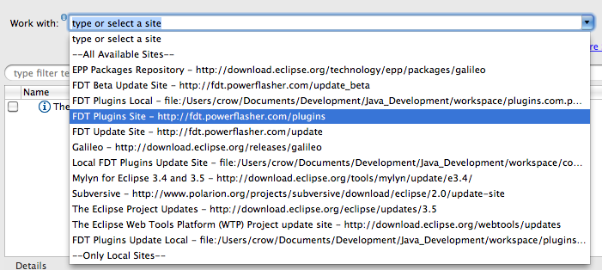
dhspwgc_108djw2z74p_b5. Select the option “FDT haXe plugin” from the items presented and click Finish. Allow the installation to complete.


Configuring the haXe Plugin
Before the newly installed haXe plugin can be used, it will need to be configured so it knows where to find the haXe compiler on your machine. To do this, select Window->Preferences from the menu and navigate to the HaXe->SDK option. You should be presented with a textfield control with the label HaXe SDK Location. Click the browse button next to this field and navigate to where your installation of the haXe compiler exists, then click OK on both dialogs to close them. On windows machines, the haXe installation will usually exist at the location:

C:\Motion-Twin\haXe

Mac OSX users may want to try:

/usr/lib/haXe

Using the haXe Plugin
Now for the fun stuff. Create a new AS3 project by selecting File->New from the menu and choosing “Empty AS3 Project” from the presented list of options. In the field titled Project name, enter “Hello haXe”. Now click OK.

Now, right click on the src directory in the project file tree and select New-> Haxe Class. If this option does not appear in the context menu, FDT will need to be refreshed. You can do this by selecting the menu option Window->Reset Perspective.

When the new class dialog is displayed, give the class the name “Main” and click OK. A new file should now exist in the src directory.

We now have a haXe project and class file, which is great, but we haven’t yet told the haXe compiler what type of project we’re building. To do this, right click on the project node in the file tree pane and select Add HaXe Project Nature. This will raise a new wizard. You can immediately click the next button, as we are not interested in modifying the haXe SDK location for this project.

The second screen in the new wizard provides the option to specify the target platform for our project. Currently, this includes:

· Flash9 SWF (AVM2 target)

· Flash SWF (AVM1 target)

· Javascript

· AS3 Code

· Neko Binary

· PHP Code

· C++ Code

Each of these target platforms are fully supported by the FDT plugin and we recommend that you play with this option at your leisure. However, for this example, choose the Flash9 SWF option.

If you look in your project file list, you should notice a new file with the extension “.hxml”. This is your project compiler settings. You can alter this file by right-clicking it and selecting Open With->Text Editor. Simply double clicking the file will launch the haXe compiler if using the Windows installation of FDT.

The haXe plugin supports a wealth of compiler switches and options, and we advise that you read about them on the haXe website at http://haxe.org/doc/compiler.

Open the Main class and enter the following code:

package;

class Main {
public static function main() {
trace( “Hello, World” );
}
}

Save this file and run it. A new SWF file will be compiled into your project directory.

We at Powerflasher, along with Influxis, are very excited about the new possibilities provided by this plugin and, as always, we would welcome any feedback, bug notifications and feature requests you may provide. We encourage all such information to be posted on our issue tracking website. With your help, we aim to make FDT a truly unique experience for applications development.

What’s Next?
We are currently busying away on the haXe plugin for a major Beta release. This will include the ability to create haXe projects using FDT’s fully integrated project wizard as well as being able to compile and launch directly within the FDT workflow. We aim to make FDT the best haXe development environment available just as it is for Flash!


Release Notes FDT 4 Milestone 4

August 16, 2010 by Carlo Matic

Compilation Improvements and new AS3 Formatter Compile your Flash/Flex/AIR projects way faster now and chain up launch configurations for complex build processes. The new AS3 Formatter gives you even more settings to configure your code style.

  • Faster Compilation

By using the Flex Compiler API instead of FCSH/MXMLC compile speed of both full and incremental build has increased tremendously.

  • Less Memory Consumption

By getting rid of FCSH memory consumption was also reduced dramatically especially in bigger projects with multiple modules.

  • Launcher Chains

The new tab “Launcher Chain” in the FDT launch configurations makes it possible to chain up launch configs of any type as well as ANT targets in any desired order. This makes it very easy to setup complex build processes.

  • New AS3 Formatter

Even more options in the AS3 Formatter settings to configure your code style.

  • Use Embed source paths relative to the src folder 
  • Compile progress shown in FDT Progress panel 
  • Launch Configurations are saved in the project by default
  • Button next to Run/Debug to reset all active compiler instances
  • Flex Compiler API is also used in FDT ANT tasks
  • Flex SDK version compatibility restrictions deactivated

Known Issues

    <fdt.startDebugger/> ANT task broken

Note:

    If you’ve changed the default project types and templates, FDT will reset them after updating.

Download

  • Existing FDT4 users: If you have FDT4 already you can get the latest update from the Eclipse menu item Help->Check for Updates
  • New FDT4 users: If new to FDT4, you can download the latest milestone standalone installer here for a 30 days trial.
  • Current FDT3 users: If you hold a FDT 3 license already, either Pure, Professional or Enterprise, you can run full FDT4 Beta features until released. Enjoy!
  • New FDT 3.5 users: If you bought FDT 3.5 after 25 January 2010 FDT 4 is free for you!

Additional improvements or bug fixes in M4: bugs.powerflasher.com

Fixed Bugs

[FDT-817] – Nesting try-catch blocks render false errors for the error instance

[FDT-825] – Back References has duplicate items in Profiler

[FDT-858] – missing error warning at missing space in code

[FDT-872] – Function file import statements do not get fixed during refactoring

[FDT-881] – Launch configuration for swc library doesn’t use -external-library-path

[FDT-918] – Vector class not imported when targeting Flash 10

[FDT-921] – Missing Autocomplection after newline seprated dot.

[FDT-928] – Exporting AIR release build uses wrong Flex SDK.

[FDT-933] – Highlighting matching bracket is flickering, when making a selection by cursor keys

[FDT-940] – Problem using post-compile Ant task inside an AS3 launch profile

[FDT-990] – Init outline throws error when closing editor

[FDT-1033] – FDT Library Launcher must remove -is compiler arg when using manifest.xml

[FDT-1042] – compilation flex sdk 4.1

[FDT-1065] – Nullpointer exception when choosing “auto addd RSLS on debug” during launch

[FDT-1069] – AIR Application release broken

[FDT-1072] – Create AIR Certificate has no function anymore

[FDT-1073] – Compiler Arguments auto add carriage returns inbetween arguments

[FDT-1077] – Launching with SDK > 3.5 invokes no viewer. Halts on fcsh complete.

[FDT-1079] – FDT does not compile, after Exception is thrown

[FDT-1086] – Exception while opening project – restart of eclipse needed

[FDT-1114] – Fix Shortcut for Rename refactoring

[FDT-1115] – Automaticly fix library path of old launchers

[FDT-1116] – Organize Import always adds blank line after last import

Improvement
[FDT-124] – Add “Check All” button in Formatter preferences
[FDT-879] – ANT task for FDT Profiler
[FDT-919] – Cannot add Linked Libraries via FDT Build Path Preferences
[FDT-988] – Icons for new features in FDT 4
[FDT-1081] – Tracing a variable by typing its name with or without “;”
[FDT-1118] – Build time infos should not be red

Known Issues
Working on these issues now check our bugs.powerflasher.com

Get FDT5