Up

Share your Content with the FDT Community

You want to join the FDT community? That’s easy, simply send us your news and be part of the FDT community page

[contact-form-7 id=”6383″ title=”Take Part”]

Linux builds have been tested on Ubuntu but should run on other distributions too.

With the download of FDT you accept our EULA

Featured

FDT Views/Editors follow Dark Theme

With this release FDT can easily switched to dark theme:Simply select the Dark theme and apply. The Dark theme is available since Eclipse 4.4 (Luna). Older versions of Eclipse (and FDT) does not support color themes of this form. The FDT views and editors will switch to their default dark color set: In case you […]

by FDT Team

FDT Newsletter

Subscribe to our FDT mailing list and get the latest news and vouchers! * indicates required Email Address * First Name Last Name

by FDT Team

FDT Milestone 10 – 10 years anniversary

We‘re happy to announce FDT Milestone 10! It‘s been 10 years since our first FDT release and a lot happened since last years Milestone 9. We went on to improve FDT and your IDE experience. Here is a list with our new key features: Ant Project Generator Dump launch configuration Library Project Template ActionScript refactorings […]

by FDT Team

Library Project Template

This new FDT release contains features to support a more fluent development of SWC libraries. The primary starting point to develop a library is the new Library Project Template for AIR or Web: This template creates an empty library project containing two source folders: All compilation units to include into the library should be placed […]

by FDT Team

Release 9.9 – Project groups

With this release the FDT Explorer can present projects in groups: Each Project Group is a set of workspace projects (i.e.: Working Set). Each project can be a member of one group and can not be shared among groups. Project Groups are logical structures shown inside FDT Explorer. Neither they represent nor they change the […]

by FDT Team

FDT 4 Milestone 3 Live Demo

June 25, 2010 by Carlo Matic

Dear FDT Community!

The FDT team is proud to show you the release of FDT4 Milestone 3 live.

WATCH RELEASE PREVIEW LIVE ON USTREAM
Tuesday, June 29, 2010 at 9:00 AM (PST)

This milestone release is dedicated to Flex 4 and includes support for the new MXML 2009 language features like Spark, FXG, States and the new language tags.
(more…)

Press Release: FDT 4 – Milestone 2

May 17, 2010 by Carlo Matic

At the beginning of 2010, the multimedia agency Powerflasher released the current Version 3.5 of the Development Tool for Flash (FDT). Now they’re back with yet another enhanced version. September 2010 is the date already set for FDT 4 – the next version of the Eclipse-based Flash development environment. Once again it promises to bring a host of improvements and brand new features for Flash developers. “The ongoing development of FDT is a continuous, dynamic process for us. By launching our new releases in quick succession we are always striving to provide our users with the most powerful FTD version possible for the development of their Flash projects,” said Carlo Blatz, Founder and Managing Director of Powerflasher. The agency also has a special offer in store: All those users who purchased the previous Version 3.5 after 25 January will be able to upgrade to the new FDT 4 free-of-charge. (more…)

FDT 4.0 M2 "Making Things Easier" released

May 10, 2010 by Michael Plank
After the successful release of FDT 4.0 M1 including a state of the art Profiler, the team is proud to announce the release of FDT 4 Milestone 2. When we asked the community which new features they want to see in the next major version of FDT the majority answerd with: „Make things easier“. All features and improvements of Milestone 2 are dedicated to this request.
The main new features are a completely reworked Flex SDK management, and a brand new project management including project types and project templates.
After the successful release of FDT 4.0 M1 including a state of the art Profiler, the team is proud to announce the release of FDT 4 Milestone 2. When we asked the community which new features they want to see in the next major version of FDT the majority answerd with: „Make Things Easier“. All features and improvements of Milestone 2 are dedicated to this request.

The main new features are a completely reworked Flex SDK management and a brand new project management including project types and project templates.

New Flex SDK management

The core library system of FDT 3 has been completely removed and replaced by an easy to use SDK management. The confusing core library variables like Flex_SDK_0_Pure or Flex_SDK_0_for_FP10 are finally history. You will not find them any more in M2.

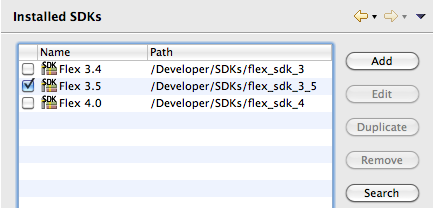
Managing your SDKs like adding, removing, duplicating or editing Flex SDKs of any version is amazingly easy now.

Adding an additional Flex SDK is now as simple as clicking the Add button and selecting a folder. FDT scans the SDK folder and displays detailed information on version number and included SWC libraries.

Nice right? But we made it even easier. Add multiple Flex SDKs with just one click by using the Search functionality! FDT will search for available SDKs on your hard disc and will automatically add them.
New project management

Milestone 2 introduces project templates as well as project types. Creating a new Flash project will now open up the brand new project creation wizard.
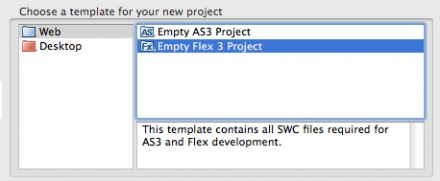

Just select a template from any category and FDT will create a new project based on the selected template. M2 ships with some predefined templates but you can create your own templates as well. You can incorporate source folders, an icon, files and folders, packages with classes and SWCs that should automatically be added to the classpath to your template. Check out this tutorial on how to create your own templates.

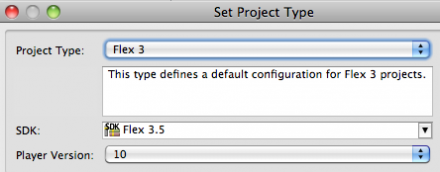
FDT 4 M2 also brings the concept of project types into use e.g. „Flex 3 Project“ or „AS3 AIR Project“. A project type defines the basic setup of a project like linked Flex SDK SWCs, available viewers and compiler arguments. Same as templates, project types are defined in XML format and can be edited or added by the user. The project type can be changed at all time for example from a Flex 3 project to a Flex 3 AIR project.
Project settings

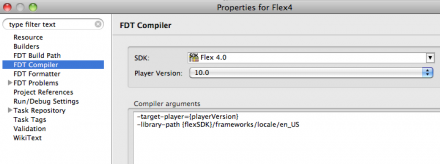
Compiler settings can now be edited in the project properties.


Launch configurations now use the settings from the project properties by default. You can still override these settings in the launch config.

The Flex SDK and target Flash Player version can easily be changed.

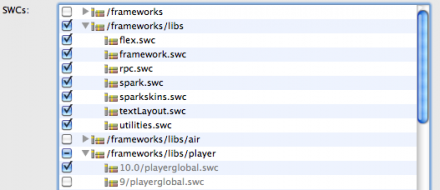
In the project build path settings you will now find a new tab called „SDK library“. Here you can add and remove Flex SDK SWCs by just selecting/deselecting them.

User wide preferences

The new settings for installed Flex SDKs, project templates and project types are now stored in the user directory. This implicates that these configurations are available across multiple workspaces!

We strongly believe that putting more and more settings to the user folder is the right way to go. It would put an end to setting up all FDT preferences whenever you create a new workspace. Feedback to this decision is highly appreciated!

Migration from FDT 3 to FDT 4

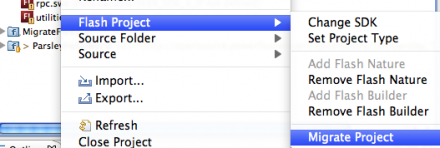
FDT 4 M2 uses new project setting files (invisible .files). Therefore an old project created with FDT 3 needs to be migrated to a FDT 4 project. Justright click the old project and select Flash Project > Migrate Project. This feature adds the new project files based on the old settings. After migrating to a FDT 4 project you can still work on it in FDT 3.
Links

Happy coding,
Michael

FDT @ FITC Amsterdam 2010

March 1, 2010 by Michael Plank

A well-attended FDT booth, a FDT session with a lot of great news and a FDT Pure license for every attandee.

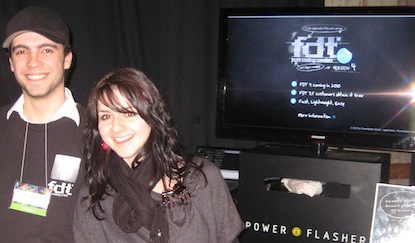
FDT at FITC Amsterdam was a thorough success! A lot of people stopped by at our nice booth where we demonstrated FDT especially the new features of FDT 4 Milestone 1. Attendees could test those features like the new Profiler in the FDT test center. There was a FDT card in every goody bag the people could fill out. Everyone who dropped this card at our booth got a free FDT Pure license.

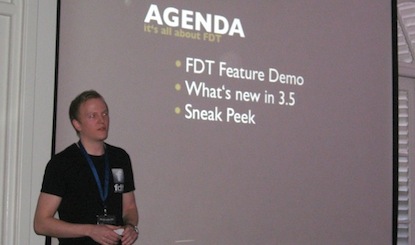
I also had the chance to give a FDT presentation, my debut at a FITC conference. Beside a speed coding demo I demonstrated the improvements of FDT 3.5 and the roadmap as well as the new features of FDT 4 Milestone 1: the Profiler and the Welcome Screen. Slides of the talk can be downloaded here.

I also uploaded some pictures to Flickr.

Have fun,
Michael

FDT 4 – Milestone 1 Release

February 21, 2010 by Carlo Matic

No, this is not a typo. Shortly after the great and successful release of FDT 3.5 we want to present our next major development step of FDT: FDT 4 “Milestone 1”! We are very excited about this release, this is going to be the best FDT release in history! (more…)

Get FDT5