Up

Share your Content with the FDT Community

You want to join the FDT community? That’s easy, simply send us your news and be part of the FDT community page

[contact-form-7 id=”6383″ title=”Take Part”]

Linux builds have been tested on Ubuntu but should run on other distributions too.

With the download of FDT you accept our EULA

Featured

FDT Views/Editors follow Dark Theme

With this release FDT can easily switched to dark theme:Simply select the Dark theme and apply. The Dark theme is available since Eclipse 4.4 (Luna). Older versions of Eclipse (and FDT) does not support color themes of this form. The FDT views and editors will switch to their default dark color set: In case you […]

by FDT Team

FDT Newsletter

Subscribe to our FDT mailing list and get the latest news and vouchers! * indicates required Email Address * First Name Last Name

by FDT Team

FDT Milestone 10 – 10 years anniversary

We‘re happy to announce FDT Milestone 10! It‘s been 10 years since our first FDT release and a lot happened since last years Milestone 9. We went on to improve FDT and your IDE experience. Here is a list with our new key features: Ant Project Generator Dump launch configuration Library Project Template ActionScript refactorings […]

by FDT Team

Library Project Template

This new FDT release contains features to support a more fluent development of SWC libraries. The primary starting point to develop a library is the new Library Project Template for AIR or Web: This template creates an empty library project containing two source folders: All compilation units to include into the library should be placed […]

by FDT Team

Release 9.9 – Project groups

With this release the FDT Explorer can present projects in groups: Each Project Group is a set of workspace projects (i.e.: Working Set). Each project can be a member of one group and can not be shared among groups. Project Groups are logical structures shown inside FDT Explorer. Neither they represent nor they change the […]

by FDT Team

14th Update-Release is out

April 17, 2013 by FDT Team

We are happy to release the next iteration with new features and improvements for FDT6. We count more than 170 changes since FDT5.6 now. You can use most of them in our Free Version or get an upgrade to the full version (starts at 14,75€ / month).

See all release notes here. Thats the latest:

Features & Improvement

Bugs Fixed

Download

To download FDT either insert http://fdt.powerflasher.com/update/fdt under ”Help -> Software Updates -> Find and install…” in Eclipse or download the standalone version on http://fdt.powerflasher.com/buy-download.

Many thanks to all the beta testers, keep posting your feedback!

Happy coding wishes your FDT Team.

The Next Generation of FDT Released

October 15, 2012 by Carlo Matic

Aiming to deliver the best product for the interactive community is an ongoing goal for us. Our process is simple: listen to customers, think about their needs and all the while looking ahead to see what is on the horizon.

Our goal and process has lead us to bring FDT to a new level:  FDT will become a version-less IDE.

(more…)

FDT 5.5 Beta released!

April 16, 2012 by Carlo Matic

We are proud to announce our next great and big update for FDT 5. Right now it’s a beta version but the final release is planned very soon. It will be a free update for all FDT 5 customers. We added some great new features to this “major minor release” and we’re sure you’ll like them. The main feature we integrated is the new community feature “SWF Bridge”. It allows you to write your own FDT Plug-Ins in ActionScript. Nearly everything is possible, so check out Alan’s blogpost and get started with your first official FDT Plug-In. But there is a lot more in it:

New Features

  • SWFBridge
  • Blackberry Integration
  • ANE Support
  • FDT Setup Wizard
  • Conditional Breakpoints
  • Instance Breakpoints
  • Exception Breakpoints
  • Selectable Debugger SDK
  • Quick Fix to generate a getter and/or setter at Class-Instance
  • Quick Assist to generate a getter and/or setter at Class-Instance
  • Enable choosing the default view player for debug/run dialog

Improvements

  • Automatically rename fields when create getters and setters.
  • Change field to private after setter/getter generation
  • QuickFix for new code should take priority over Assist
  • Profile & Debug without compiling
  • Flexible SDK setups
  • New Project Templates
  • New Project Template Featuers
  • Set default for haXe Flash projects to AVM 2
  • Captive runtime GUI support
  • Change Exit Postion For ‘Create Field In Class…’
  • Update haXe SDK OSX, Linux & Win to 2.08
  • Update Neko OSX, Linux & Win to 1.8.2

Known issues can be found in our Jira.

New License Management

We also added a complete new license management to support a highly requested new licensing model: subscriptions. With the new license management FDT will verify the key with a license server on our side. A blogpost with detailed information will be released a few days before the final release.

Download

Update: FDT 5.5 is about to be released; we have disabled the download of the beta to avoid confusion. Stay tunned everyone!

To download the FDT 5.5 Beta just go to our special code site and enter the special code FDT55BETA. An E-Mail with a beta license key (valid until May 8th) and the download links will be send to you right after registration.

Issuetracker

If you find any bugs or other issues during the beta test please let us know in the Jira.

We wish you a lot of fun testing the new version and are excited to hear your feedback.

Happy coding!


FDT 5 coming soon!

August 30, 2011 by Carlo Matic

We’re proud to officially announce FDT5 in October. A microsite will guide you to all details and news about it in the next weeks.

Just like the Internet evolves with new technologies, FDT continuously takes technological leaps. We are currently working hard on FDT 5 to bring you a whole new level of flexibility, power and comfort. New technologies, new editions, new features, new prices, and an awesome surprise will blow your mind. FDT 5 will be launched in October and we want to celebrate the news in four steps. Little by little we will show you more and more about the new version of FDT on our new HTML5 promotion site (created in FDT 5):

http://FDT5.com

With FDT 5 we want to evolve the future as the most flexible development tool for interactive coders and game developers. Flash and Flex will still be the #1 technologies, but it will also focus on HTML5 / JavaScript / WebGL, PHP with Haxe and mobile and game development.

Share the news on Twitter or Facebook and win an FDT5 Max license:
@FDT5 release is announced for October and will focus additionally to AS3 & MXML on HTML5, JS, WebGL, PHP and more via @FDThaXe

Get thrilled for the new FDT and stay tuned!

FDT 4.4 Release & FDT 4.5 Announcement

May 17, 2011 by Carlo Matic

We’re delighted to officially release FDT 4.4

This was possible thanks mainly to your feedback we received since our Beta release. You can now safely take advantage of the enormous Apparat benefits within FDT. As usual, bug fixes and improvements can be found in our Release Notes.

As part of our open culture initiative, we like to share with you some information on the next release FDT 4.5 we are currently working on.

First of all, we can assure you, FDT 4.5 will be another free update for all existing FDT customers!

FDT 4.5 main focus will be to suppor the new Flex 4.5 SDK, just recently officially released by Adobe, AIR creation workflow productivity improvements and support for mobile & devices.

We encourage everyone to continue sending us feedback, your input is extremely valuable to us.

We would also like to advice flash developers using of Apparat, to join the mailing list and consider contributing to the Apparat source code.

Stay tuned on this screen for more exciting news.

Happy Coding!

The FDT Team

Announcing FDT haXe plug-in Public Beta supported by Influxis

May 12, 2011 by Carlo Matic

We are happy to announce the FDT haXe Beta plug-in as a public release as part of our contribution to the Flash Community Open Source program.

Developed in collaboration with Influxis, the FDT haXe plugin provides developers a powerful tool for authoring the haXe multi-platform language. Our goal is to provide the best haXe coding experience and that it feels like coding in the AS3 or MXML editor of FDT: same shortcuts, same syntax coloring, same coding comfort.

Here’s a feature overview:

  • Live error checking
  • Autocompletion (variables and functions)
  • Syntax coloring
  • Code editing features
  • Open Type
  • New Class/Interface/Enum wizards
  • HaXe Project Wizard

Here are additional built-in new features of the haXe plugin.

  • Setup an SWF output in your HXML. When it builds, right click on the SWF and select Run As > SWF File.
  • Setup a JS output. Right click on the generated JS file and select Run As > JavaScript in browser or Run As > Node.JS server (NB: needs Node.JS installed, and the project needs to include the haxe/node library from bdog-node on github).
  • Compile haxe to C++. Right click on the generated executable and select Run As > Native Executable (you have to do “haxelib setup ; haxelib install hxcpp” for this to work).
  • Compile to Neko. Right click on the generated neko file and select Run As > Neko VM

More information on the FDT Documentation website.

Some of you might be wondering … What is haXe ?

haXe is an independent multiplatform open source programming language. haXe can publish the same project to Flash, Javascript, PHP, C++, Neko, and in the future it will support more tagets such as Java and C#. haXe helps to leverage the best performance and best features for each platform.

Writing code in haXe is similar to writing Actionscript. Additionally, you could write an application or game that targets Javascript and HTML5 Canvas, or you could leverage server side targets like PHP or Neko so that you can share your classes on both the front-end and back-end. Thanks to haXe you can create an application that runs, for example, on Facebook and runs on an iPad or TouchPad.

The haXe code is MIT licensed, there are no licensing fees or limitations. Most importnat, haXe has a passionate open-source community behind, very willing to help and support developers.

You can find more information on haXe.org

So… what are you waiting for?

Install FDT’s haXe Plugin, just follow the instructions on our haXe FDT Installation tutorial.

More haXe news will be published soon, stay tuned! Follow @FDThaXe to keep up to date on latest development.

Happy Coding from the FDT and Influxis Team!

P.S. Big kudos to Powerflasher’s design team creating haXe new logo! Let us know how you like it.

4.1.2 Release

January 13, 2011 by Alan Klement

The FDT team has released a small update to FDT4 – 4.1.2.

FDT users, via JIRA, have let the team know that they were running into some problems with AIR application development. We’ve recognized that they needed to be fixed ASAP so we’ve spent a few days fixing them and it’s now ready to be released.

A special thank to Berend Weij, Joeri van Oostveen and Steven Sacks for their contribution.

We also fixed an issue when adding a string to the ‘-define’ compiler argument. It’s an edge case, but it was causing some issues for those who rely on it a good bit.

Download the update via FDT’s ‘Help>Check For Updates’ menu as described in our FAQ. To see the specific tickets we fixed, check the release notes.

FDT 4 is released!!!

September 24, 2010 by Carlo Matic

Monday, September 27th 2010 you will be able to buy the new FDT 4 Pure, Plus or Max.

We are excited that FDT 4 is being considered the best Powerflasher release ever, and it’s thanks to you!

A bit of history

When Powerflasher was founded in 1997 as a digital interactive agency, many flash developers were missing a professional ActionScript code editor to build cutting edge software applications. In the year 2001 we decided to start building our own IDE based on Eclipse. The developers loved it and it spread like crazy. FDT 1.0 was born!

FDT 4 and the community

Starting in January 2010 with the release of FDT 3.5 we traveled the world to meet you at work, conferences (and of course some great parties). We openly shared the FDT 4 roadmap with you and, being big agile advocates, we made our internal iterations/sprints public free Milestones! We worked iteratively with you and we worked hard! Your contributions, constructive support, and great ideas were an integral part of the FDT 4 release and we think you’ll be pleased with the spectacular list of new features.

ActionScript 2 support

As Adobe is moving away from ActionScript 2, so is Powerflasher putting more effort into future languages as well. We however acknowledge there are still many projects developed in AS2, including some new exciting embedded devices applications. For this reason, we have decided to still offer FDT 3.5 with the full Enterprise features with AS2 support as an option for all FDT 4 customers for 99$

FDT Labs

In parallel to our milestones, we created the FDT labs, an open playground. We built the SDK  to empower you to create your own plug-ins and you did: The haXe (Beta) plug-in supported by Influxis and the FDT Code Metrix Pflection plug-in from iceX33. The Dependency Visualizer and Font Creator born from the labs playground as plug-ins are now core functionality of FDT 4!

We are committed in providing a cross-platform experience. We are very proud to have the opportunity to extend Linux support in our Labs with the help of the community.

New product names: Pure, Plus and Max

We kept the name Pure because we could not express better what the FDT Pure Coding Comfort is about. Pure great editing features enables the smooth workflow you are all raving about. FDT Professional is now called Plus. In addition to the Coding Comfort, Plus adds the navigation features to help you become more productive and work collaboratively. FDT Enterprise becomes Max. FDT Enterprise is not only for corporations, if you are either a freelancer or working in a team of power developers, performance is what you need! It’s about enabling developers to break barriers and maximize their productivity by taking advantage of state of the art IDE features power developers truly deserve.

New Prices

Since then we have released several upgrades, mostly for free. The last upgrade we charged was in the beginning of 2008 with the FDT 3 Enterprise release. For about tree years all upgrades were available for free, including FDT 3.5. We also decided to give all new FDT 3.5 buying customers a free FDT 4 upgrade! It’s now time to pay the bills and further invest to keep the engineering team and you happy.

Check the prices on our website.

Now get your hands on FDT and start coding.

Please use this temporary license until a new pesonalized key is available starting this Monday, September 27th 2010

Follow this link to Register and Download FDT 4

Special thanks…

The FDT 4 release is a result of this journey, thanks to your support and the passion of the big Powerflasher FDT family!

Stephanie, Meinhard, Philipp, Sebastian, Simon, Florian, Maxim, Keisuke, Olli, Britt, Stefan(s), Timo(s), Andre, Mattes, Alan, Clement, Bruno, Michael, Nico, Robertina, Sabrina and Carlo, the Powerflasher Developer and Designer Team (aka FDT guinea pigs) and last, but not least, you!!!

FDT4 Release Candidate (RC1) Open Beta!

September 11, 2010 by Michael Plank

Open Beta to everyone

We are proud to announce our first FDT4 Release Candidate and we have decided to open up this Beta release to everyone!
It features awesome new stunning features, additional Flex support, the Dependency Visualizer and Font Library Creator, it also includes a lot of bug fixes and improvements.

Additional Flex support

Now with full coding comfort for MXML. Use all your favourite shortcuts in MXML as well.

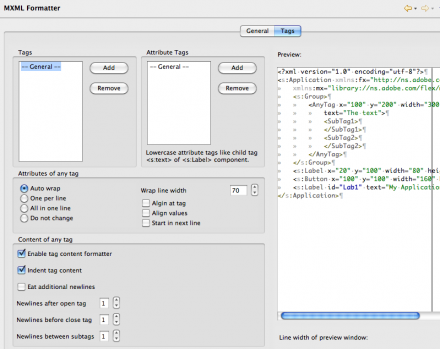
  • MXML Formatter (CMD/CTRL+Shift+F)
  • Quick Fixes in MXML (CMD/CTRL+1)
  • Organize Imports in MXML (CMD/CTRL+Shift+O)
  • Toggle Comment in MXML (CMD/CTRL+7)

Dependency Visualizer


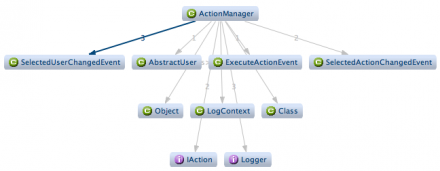
Detect design or dependency problems between types or packages at a glance with the Dependency Visualizer (Window > Show View > Type/Package Dependencies*).

Font Library Creator


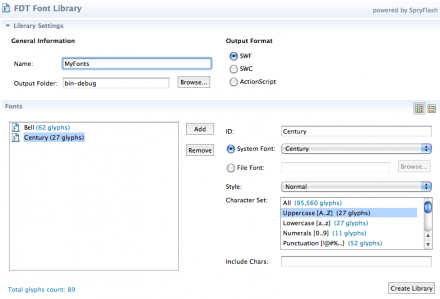
Create font library SWF or SWC files with just a few clicks using the new visual Font Library Creator. (New -> FDT Font Library*).

Note:
* Please reset your perspective (Window > Reset Perspective) if you don’t see the new items.

The new design

We know that FDT is not just technology. Coding comfort is more. So, apart from stunning features, we are happy to release FDT with a new brand, logo and visual. If you want to know more about the design process and see how the visual was developed, visit our collegues who created the new brand: britzpetermann.com

Download

Please notice FDT has a new license verification system, a new serial number activation is required for all users!

You will notice the new key is very long, it’s huge! Do not be frightened 😉 The good news you can simply copy and paste it to the new FDT registration dialog under the Help Menu.

You can grab the key here.

– Existing FDT4 users: If you have FDT4 already you can get the latest update from the menu item Help->Check for Updates

– New FDT4 users: Register here to receive the download instructions for FDT4 (RC1) and your Beta key. Enjoy!

Detailed report
For more information about this release, check the following report on bugs.powerflasher.com

Release Notes FDT 4 Milestone 4

August 16, 2010 by Carlo Matic

Compilation Improvements and new AS3 Formatter Compile your Flash/Flex/AIR projects way faster now and chain up launch configurations for complex build processes. The new AS3 Formatter gives you even more settings to configure your code style.

  • Faster Compilation

By using the Flex Compiler API instead of FCSH/MXMLC compile speed of both full and incremental build has increased tremendously.

  • Less Memory Consumption

By getting rid of FCSH memory consumption was also reduced dramatically especially in bigger projects with multiple modules.

  • Launcher Chains

The new tab “Launcher Chain” in the FDT launch configurations makes it possible to chain up launch configs of any type as well as ANT targets in any desired order. This makes it very easy to setup complex build processes.

  • New AS3 Formatter

Even more options in the AS3 Formatter settings to configure your code style.

  • Use Embed source paths relative to the src folder 
  • Compile progress shown in FDT Progress panel 
  • Launch Configurations are saved in the project by default
  • Button next to Run/Debug to reset all active compiler instances
  • Flex Compiler API is also used in FDT ANT tasks
  • Flex SDK version compatibility restrictions deactivated

Known Issues

    <fdt.startDebugger/> ANT task broken

Note:

    If you’ve changed the default project types and templates, FDT will reset them after updating.

Download

  • Existing FDT4 users: If you have FDT4 already you can get the latest update from the Eclipse menu item Help->Check for Updates
  • New FDT4 users: If new to FDT4, you can download the latest milestone standalone installer here for a 30 days trial.
  • Current FDT3 users: If you hold a FDT 3 license already, either Pure, Professional or Enterprise, you can run full FDT4 Beta features until released. Enjoy!
  • New FDT 3.5 users: If you bought FDT 3.5 after 25 January 2010 FDT 4 is free for you!

Additional improvements or bug fixes in M4: bugs.powerflasher.com

Fixed Bugs

[FDT-817] – Nesting try-catch blocks render false errors for the error instance

[FDT-825] – Back References has duplicate items in Profiler

[FDT-858] – missing error warning at missing space in code

[FDT-872] – Function file import statements do not get fixed during refactoring

[FDT-881] – Launch configuration for swc library doesn’t use -external-library-path

[FDT-918] – Vector class not imported when targeting Flash 10

[FDT-921] – Missing Autocomplection after newline seprated dot.

[FDT-928] – Exporting AIR release build uses wrong Flex SDK.

[FDT-933] – Highlighting matching bracket is flickering, when making a selection by cursor keys

[FDT-940] – Problem using post-compile Ant task inside an AS3 launch profile

[FDT-990] – Init outline throws error when closing editor

[FDT-1033] – FDT Library Launcher must remove -is compiler arg when using manifest.xml

[FDT-1042] – compilation flex sdk 4.1

[FDT-1065] – Nullpointer exception when choosing “auto addd RSLS on debug” during launch

[FDT-1069] – AIR Application release broken

[FDT-1072] – Create AIR Certificate has no function anymore

[FDT-1073] – Compiler Arguments auto add carriage returns inbetween arguments

[FDT-1077] – Launching with SDK > 3.5 invokes no viewer. Halts on fcsh complete.

[FDT-1079] – FDT does not compile, after Exception is thrown

[FDT-1086] – Exception while opening project – restart of eclipse needed

[FDT-1114] – Fix Shortcut for Rename refactoring

[FDT-1115] – Automaticly fix library path of old launchers

[FDT-1116] – Organize Import always adds blank line after last import

Improvement
[FDT-124] – Add “Check All” button in Formatter preferences
[FDT-879] – ANT task for FDT Profiler
[FDT-919] – Cannot add Linked Libraries via FDT Build Path Preferences
[FDT-988] – Icons for new features in FDT 4
[FDT-1081] – Tracing a variable by typing its name with or without “;”
[FDT-1118] – Build time infos should not be red

Known Issues
Working on these issues now check our bugs.powerflasher.com

Get FDT5