Up

Share your Content with the FDT Community

You want to join the FDT community? That’s easy, simply send us your news and be part of the FDT community page

[contact-form-7 id=”6383″ title=”Take Part”]

Linux builds have been tested on Ubuntu but should run on other distributions too.

With the download of FDT you accept our EULA

Featured

FDT Views/Editors follow Dark Theme

With this release FDT can easily switched to dark theme:Simply select the Dark theme and apply. The Dark theme is available since Eclipse 4.4 (Luna). Older versions of Eclipse (and FDT) does not support color themes of this form. The FDT views and editors will switch to their default dark color set: In case you […]

by FDT Team

FDT Newsletter

Subscribe to our FDT mailing list and get the latest news and vouchers! * indicates required Email Address * First Name Last Name

by FDT Team

FDT Milestone 10 – 10 years anniversary

We‘re happy to announce FDT Milestone 10! It‘s been 10 years since our first FDT release and a lot happened since last years Milestone 9. We went on to improve FDT and your IDE experience. Here is a list with our new key features: Ant Project Generator Dump launch configuration Library Project Template ActionScript refactorings […]

by FDT Team

Library Project Template

This new FDT release contains features to support a more fluent development of SWC libraries. The primary starting point to develop a library is the new Library Project Template for AIR or Web: This template creates an empty library project containing two source folders: All compilation units to include into the library should be placed […]

by FDT Team

Release 9.9 – Project groups

With this release the FDT Explorer can present projects in groups: Each Project Group is a set of workspace projects (i.e.: Working Set). Each project can be a member of one group and can not be shared among groups. Project Groups are logical structures shown inside FDT Explorer. Neither they represent nor they change the […]

by FDT Team

FDT 3.5 Beta 2 released

December 17, 2009 by Michael Plank

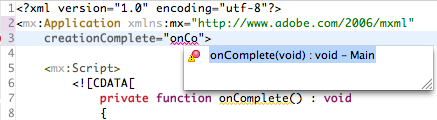
FDT 3.5 Beta 2 introduces full Autocompletion support for the MXML Editor. Use your favorite shortcut CTRL + Space everywhere in the MXML Editor like in CDATA scripts, in quotes or curly braces of MXML tags to auto complete AS3 code.

The FDT Search now also finds search terms in your MXML files and will display them properly in the search view. In addition we have added wizards for creating Top Level Variables and Functions and a lot new Code Templates for Metadata Tags, Flex Lifecycle methods, Vector.<> and so forth. Take a look at the list of new features introduced in Beta 2 and Beta 1 here.

This is the last beta update before we will release the final version of FDT 3.5 currently planned for January.

Your support is highly appreciated. If you find any bugs or have any feature requests, please report them at bugs.powerflasher.com

Update FDT now to 3.5 Beta 2 or download the standalone Beta Version:

Beta update site: http://fdt.powerflasher.com/update_beta/

FDT 3.5 Enterprise [Mac Cocoa] [Mac Carbon] [Win]
FDT 3.5 Professional [Mac Cocoa] [Mac Carbon] [Win]
FDT 3.5 Pure [Mac Cocoa] [Mac Carbon] [Win]

Happy coding everybody,
Michael

Documentation is out

November 27, 2007 by FDT Team

We just released a new update of FDT. The long awaited documentation is included. It contains a starter guide for AS2 and AS3, descriptions of most features FDT comes with and answers to the frequently asked questions. We hope that it will help you to discover the full power of FDT.

PDF (8 MB): FDT User Guide

Get FDT5