Up

Share your Content with the FDT Community

You want to join the FDT community? That’s easy, simply send us your news and be part of the FDT community page

[contact-form-7 id=”6383″ title=”Take Part”]

Linux builds have been tested on Ubuntu but should run on other distributions too.

With the download of FDT you accept our EULA

Featured

FDT Views/Editors follow Dark Theme

With this release FDT can easily switched to dark theme:Simply select the Dark theme and apply. The Dark theme is available since Eclipse 4.4 (Luna). Older versions of Eclipse (and FDT) does not support color themes of this form. The FDT views and editors will switch to their default dark color set: In case you […]

by FDT Team

FDT Newsletter

Subscribe to our FDT mailing list and get the latest news and vouchers! * indicates required Email Address * First Name Last Name

by FDT Team

FDT Milestone 10 – 10 years anniversary

We‘re happy to announce FDT Milestone 10! It‘s been 10 years since our first FDT release and a lot happened since last years Milestone 9. We went on to improve FDT and your IDE experience. Here is a list with our new key features: Ant Project Generator Dump launch configuration Library Project Template ActionScript refactorings […]

by FDT Team

Library Project Template

This new FDT release contains features to support a more fluent development of SWC libraries. The primary starting point to develop a library is the new Library Project Template for AIR or Web: This template creates an empty library project containing two source folders: All compilation units to include into the library should be placed […]

by FDT Team

Release 9.9 – Project groups

With this release the FDT Explorer can present projects in groups: Each Project Group is a set of workspace projects (i.e.: Working Set). Each project can be a member of one group and can not be shared among groups. Project Groups are logical structures shown inside FDT Explorer. Neither they represent nor they change the […]

by FDT Team

FDT 4 is released!!!

September 24, 2010 by Carlo Matic

Monday, September 27th 2010 you will be able to buy the new FDT 4 Pure, Plus or Max.

We are excited that FDT 4 is being considered the best Powerflasher release ever, and it’s thanks to you!

A bit of history

When Powerflasher was founded in 1997 as a digital interactive agency, many flash developers were missing a professional ActionScript code editor to build cutting edge software applications. In the year 2001 we decided to start building our own IDE based on Eclipse. The developers loved it and it spread like crazy. FDT 1.0 was born!

FDT 4 and the community

Starting in January 2010 with the release of FDT 3.5 we traveled the world to meet you at work, conferences (and of course some great parties). We openly shared the FDT 4 roadmap with you and, being big agile advocates, we made our internal iterations/sprints public free Milestones! We worked iteratively with you and we worked hard! Your contributions, constructive support, and great ideas were an integral part of the FDT 4 release and we think you’ll be pleased with the spectacular list of new features.

ActionScript 2 support

As Adobe is moving away from ActionScript 2, so is Powerflasher putting more effort into future languages as well. We however acknowledge there are still many projects developed in AS2, including some new exciting embedded devices applications. For this reason, we have decided to still offer FDT 3.5 with the full Enterprise features with AS2 support as an option for all FDT 4 customers for 99$

FDT Labs

In parallel to our milestones, we created the FDT labs, an open playground. We built the SDK  to empower you to create your own plug-ins and you did: The haXe (Beta) plug-in supported by Influxis and the FDT Code Metrix Pflection plug-in from iceX33. The Dependency Visualizer and Font Creator born from the labs playground as plug-ins are now core functionality of FDT 4!

We are committed in providing a cross-platform experience. We are very proud to have the opportunity to extend Linux support in our Labs with the help of the community.

New product names: Pure, Plus and Max

We kept the name Pure because we could not express better what the FDT Pure Coding Comfort is about. Pure great editing features enables the smooth workflow you are all raving about. FDT Professional is now called Plus. In addition to the Coding Comfort, Plus adds the navigation features to help you become more productive and work collaboratively. FDT Enterprise becomes Max. FDT Enterprise is not only for corporations, if you are either a freelancer or working in a team of power developers, performance is what you need! It’s about enabling developers to break barriers and maximize their productivity by taking advantage of state of the art IDE features power developers truly deserve.

New Prices

Since then we have released several upgrades, mostly for free. The last upgrade we charged was in the beginning of 2008 with the FDT 3 Enterprise release. For about tree years all upgrades were available for free, including FDT 3.5. We also decided to give all new FDT 3.5 buying customers a free FDT 4 upgrade! It’s now time to pay the bills and further invest to keep the engineering team and you happy.

Check the prices on our website.

Now get your hands on FDT and start coding.

Please use this temporary license until a new pesonalized key is available starting this Monday, September 27th 2010

Follow this link to Register and Download FDT 4

Special thanks…

The FDT 4 release is a result of this journey, thanks to your support and the passion of the big Powerflasher FDT family!

Stephanie, Meinhard, Philipp, Sebastian, Simon, Florian, Maxim, Keisuke, Olli, Britt, Stefan(s), Timo(s), Andre, Mattes, Alan, Clement, Bruno, Michael, Nico, Robertina, Sabrina and Carlo, the Powerflasher Developer and Designer Team (aka FDT guinea pigs) and last, but not least, you!!!

New documentation and blog redesign

September 24, 2010 by Carlo Matic

With the new FDT 4, we have also moved the documentation into a wiki. A wiki is much a more convenient way to learn and look up things than a bunch of PDF files. It is not complete yet, but Alan is doing a great job shoveling all the old docs into the wiki.

Also, you will have noticed that the blog design changed. Some might say: not for the better. 😉 However, our main intentions were (a) to unify the look’n’feel of the community ressources, and (b) to improve the readability of the blog by layout changes like more space and larger fonts.

All of this is work in progress. Now that the software is ready, we will put a lot of effort into the online ressources and the community infrastructure. After all, FDT is not just a bunch of ones and zeros, it lives by its users and the community (and what a community!).

FDT haXe Plugin Public Alpha 2 Released

September 24, 2010 by Carlo Matic

Powerflasher, in collaboration with Influxis, is proud to release the second public alpha of the haXe plugin for FDT!

This new version builds on the first alpha by providing a greatly enhanced auto-completion system, complete with automatic imports and class lookup, as well as a much needed improvement in compiler configuration by supporting the use of HXML project files. We at Powerflasher now feel that the haXe plugin for FDT provides the ultimate coding experience for the haXe language.

Here’s an up-to-date roundup of the features supported in the alpha 2 release:

· Live error checking

· Greatly enhanced auto-completion capability

· Syntax coloring

· Class / Enum / Interface file creation wizards

· Full HXML file inclusion

Installing the haXe Plugin Alpha 2 Release
If you are new to the haXe plugin alpha for FDT, you can install quite simply by following the steps below.


1. First, download the latest version of FDT4 Beta release by visiting this link and install it.
2. Download the haXe installer for your operating system from http://haxe.org/download.
3. Run the haXe installer, selecting Yes when asked if you wish to install the Neko runtime.
4. Select the “FDT Plugins Site” update site. (If it is not included in your drop down menu, enter: http://fdt.powerflasher.com/plugins in the “Work with” text input and hit return)
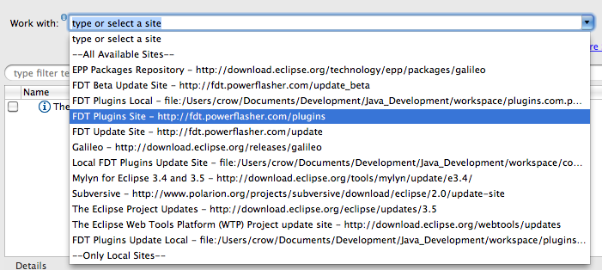
dhspwgc_108djw2z74p_b5. Select the option “FDT haXe plugin” from the items presented and click Finish. Allow the installation to complete.


Configuring the haXe Plugin
Before the newly installed haXe plugin can be used, it will need to be configured so it knows where to find the haXe compiler on your machine. To do this, select Window->Preferences from the menu and navigate to the HaXe->SDK option. You should be presented with a textfield control with the label HaXe SDK Location. Click the browse button next to this field and navigate to where your installation of the haXe compiler exists, then click OK on both dialogs to close them. On windows machines, the haXe installation will usually exist at the location:

C:\Motion-Twin\haXe

Mac OSX users may want to try:

/usr/lib/haXe

Using the haXe Plugin
Now for the fun stuff. Create a new AS3 project by selecting File->New from the menu and choosing “Empty AS3 Project” from the presented list of options. In the field titled Project name, enter “Hello haXe”. Now click OK.

Now, right click on the src directory in the project file tree and select New-> Haxe Class. If this option does not appear in the context menu, FDT will need to be refreshed. You can do this by selecting the menu option Window->Reset Perspective.

When the new class dialog is displayed, give the class the name “Main” and click OK. A new file should now exist in the src directory.

We now have a haXe project and class file, which is great, but we haven’t yet told the haXe compiler what type of project we’re building. To do this, right click on the project node in the file tree pane and select Add HaXe Project Nature. This will raise a new wizard. You can immediately click the next button, as we are not interested in modifying the haXe SDK location for this project.

The second screen in the new wizard provides the option to specify the target platform for our project. Currently, this includes:

· Flash9 SWF (AVM2 target)

· Flash SWF (AVM1 target)

· Javascript

· AS3 Code

· Neko Binary

· PHP Code

· C++ Code

Each of these target platforms are fully supported by the FDT plugin and we recommend that you play with this option at your leisure. However, for this example, choose the Flash9 SWF option.

If you look in your project file list, you should notice a new file with the extension “.hxml”. This is your project compiler settings. You can alter this file by right-clicking it and selecting Open With->Text Editor. Simply double clicking the file will launch the haXe compiler if using the Windows installation of FDT.

The haXe plugin supports a wealth of compiler switches and options, and we advise that you read about them on the haXe website at http://haxe.org/doc/compiler.

Open the Main class and enter the following code:

package;

class Main {
public static function main() {
trace( “Hello, World” );
}
}

Save this file and run it. A new SWF file will be compiled into your project directory.

We at Powerflasher, along with Influxis, are very excited about the new possibilities provided by this plugin and, as always, we would welcome any feedback, bug notifications and feature requests you may provide. We encourage all such information to be posted on our issue tracking website. With your help, we aim to make FDT a truly unique experience for applications development.

What’s Next?
We are currently busying away on the haXe plugin for a major Beta release. This will include the ability to create haXe projects using FDT’s fully integrated project wizard as well as being able to compile and launch directly within the FDT workflow. We aim to make FDT the best haXe development environment available just as it is for Flash!


Meet us @FlashOnTheBeach and in London!

September 16, 2010 by Carlo Matic

Flash On The Beach (FOTB) is an experience we at Powerflasher look forward to every year. Great people, fantastic venue and creative vibe are impressive and this year is no exception!

This is year is even more special! We are super excited to show you FDT 4, one of the greatest releases we have ever done!

FDT team have made our home in the Theater Lounge for FOTB 2010, be sure to come in and join us.

We’ve got plenty of bean bags to relax on and recharge your energy and your phones/laptops too.

Take the opportunity to meet our team, pick our brains, get cozy and talk to us directly about the latest FDT developments and join free sessions during the breaks with our FDT Heroes ! Surprises like winning a FDT 4 license included!

Powerflasher FDT Lounge Schedule

Monday, 27th Sept 2010
10:00 – 10:15 Michael Plank FDT 4 SDK Management
11:15 – 11:30 Hoss Gifford My imaginary friend.
13:00 – 13:30 Michael Plank FDT 4 new features overview + Q&A with the team
14:30 – 14:45 Lee Sylvester haXe
15:45 – 16:00 Rob Bateman Adventures in Away3D
17:00 – 17:15 Grant Skinner Presenting: My Presentation (Deck)
Tuesday, 28th Sept 2010
10:00 – 10:15 Michael Plank FDT 4 Dependency Visualizer
11:15 – 11:30 Jonny Reeves Moshi Monsters
13:00 – 13:30 Meinhard Gredig FDT4 Profiler and Q&A
14:30 – 14:45 Niqui Merret Cool Stuff
15:45 – 16:00 Robert Reinhardt videoRx.com
17:00 – 17:15 Michael Plank FDT 4 Project Templates
Wednesday, 29th Sept 2010
10:00 – 10:15 Andrea Campitelli FDT 4 Font Library Creator
11:15 – 11:30 Tink (Stephen Downs) Spark Navigators and NavigatorLayout
13:00 – 13:30 Michael Plank FDT 4 Flex 4 Fun

We will start the FDT 4 World tour in London

Thursday the 30th of Sept

If you cannot make it to Brighton, there is still a chance to meet the FDT Team in , to show you the latest FDT great new features and get your team started.

If interested, please contact us and we will arrange a time to meet you.

FDT 4 Demo Live Broadcast

September 15, 2010 by Carlo Matic

Join our next FDT 4 Release Candidate live broadcast Thursday, Sept 16th at 9:00 am PST (6:00 pm CEST)

We will have a Q&A session and show you some awesome new FDT 4 features such as the additional Flex support, Dependency Visualizer and Font Library Creator.

Follow this link for the Live Broadcast.

Please register here if you like to be reminded and mark the date on your calendar.

For more information check our website .

FDT4 Release Candidate (RC1) Open Beta!

September 11, 2010 by Michael Plank

Open Beta to everyone

We are proud to announce our first FDT4 Release Candidate and we have decided to open up this Beta release to everyone!
It features awesome new stunning features, additional Flex support, the Dependency Visualizer and Font Library Creator, it also includes a lot of bug fixes and improvements.

Additional Flex support

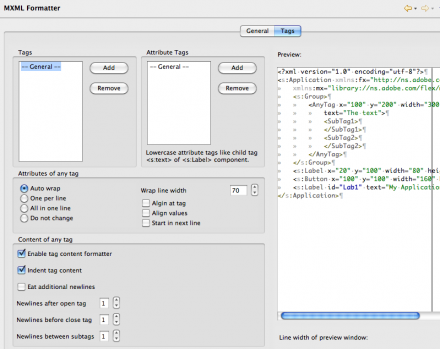
Now with full coding comfort for MXML. Use all your favourite shortcuts in MXML as well.

  • MXML Formatter (CMD/CTRL+Shift+F)
  • Quick Fixes in MXML (CMD/CTRL+1)
  • Organize Imports in MXML (CMD/CTRL+Shift+O)
  • Toggle Comment in MXML (CMD/CTRL+7)

Dependency Visualizer


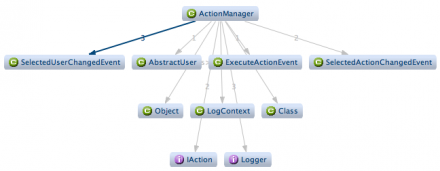
Detect design or dependency problems between types or packages at a glance with the Dependency Visualizer (Window > Show View > Type/Package Dependencies*).

Font Library Creator


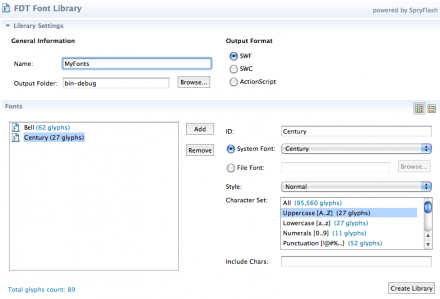
Create font library SWF or SWC files with just a few clicks using the new visual Font Library Creator. (New -> FDT Font Library*).

Note:
* Please reset your perspective (Window > Reset Perspective) if you don’t see the new items.

The new design

We know that FDT is not just technology. Coding comfort is more. So, apart from stunning features, we are happy to release FDT with a new brand, logo and visual. If you want to know more about the design process and see how the visual was developed, visit our collegues who created the new brand: britzpetermann.com

Download

Please notice FDT has a new license verification system, a new serial number activation is required for all users!

You will notice the new key is very long, it’s huge! Do not be frightened 😉 The good news you can simply copy and paste it to the new FDT registration dialog under the Help Menu.

You can grab the key here.

– Existing FDT4 users: If you have FDT4 already you can get the latest update from the menu item Help->Check for Updates

– New FDT4 users: Register here to receive the download instructions for FDT4 (RC1) and your Beta key. Enjoy!

Detailed report
For more information about this release, check the following report on bugs.powerflasher.com

FlashONGames First Meeting!

September 10, 2010 by Carlo Matic


Bruno Fonzi, Powerflasher based in San Francisco, CAhas started a new user group FlashONGames together with Alec McEachran, Senior Software Engineer @ Gaia Interactive and Allen Ellison Solutions Architect @ Adobe

You might be wonder why Powerflasher is organizing these gaming events… well the Powerflasher agency has built hundreds of games for our customers and most of all we like to play !

About FlashONGames

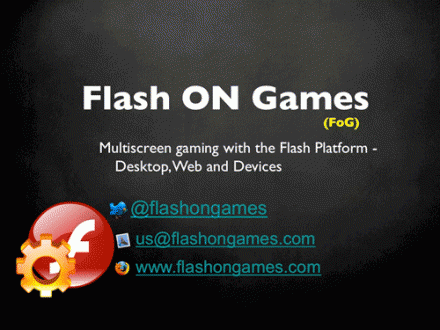
This is a flash gaming group located and hosted in San Francisco, focused and aim to involve audience and speakers at the national level. All sessions will be broadcasted live and recorded.

FlashOnGames covers all aspects of a flash gaming development phases, design best practices and technical challenges. Covering the entire gaming lifecycle, from the initial concept game idea, the designer and developer workflows, testing aspects and customers feedback and delivery.

It explores the gaming ecosystem, social platforms, frameworks, distribution, marketplace for the multiscreen gaming.

Our first FlashONGames meeting

We had an amazing turn out!  We also had fun and I hope you have learned something new too!

If you could not make it, no worries!

The video recording and presentation can be found here

Stay tuned for the next event!

Follow @FlashONGames on Twitter

In the meantime … If you have an idea or any feedback, let us know , Ask the team anything or Submit an article to publish on the FlashONGames website!

Looking forward to hearing from you!

Bruno Fonzi

Alan Klement joining the Powerflasher team

September 2, 2010 by Carlo Matic

We are excited to announce we’ve got Alan Klement as a great new Powerflasher joining the North American team today!

Alan in based in NYC, he will be evangelizing FDT while working for projects in the city that never sleeps !

1994, the year Netscape Navigator was released, is the year Alan began experimenting with web based languages. At the time, he was in middle school hacking around with C++ but the language did not excite him as much was what could be done with HTML and Javascript. In 2005, he jumped back into development when Actionscript 3 came to Flash.

Alan began using Powerflasher’s FDT in late 2008. He took to it immediately as the professional IDE that Flash Developers had been missing up to that point. He enjoyes experimenting and extending it’s features as well as building new ones.

You might have come across his blog or met Alan in person during the FDT workshop at FlashAndTheCity or FlashCamp Philadelphia

You can follow Alan on Twitter as @AlanKlement

Please welcome Alan to the Powerflasher Team!

FITC San Francisco 2010 round-up

September 1, 2010 by Carlo Matic

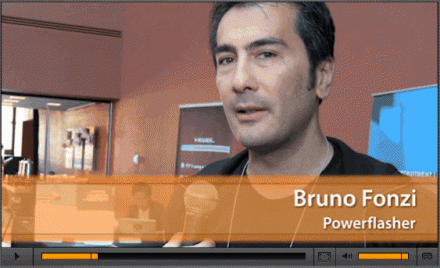
Attending the FITC festival in San Francisco, the Powerflasher team was interviewed by Adobe and featured in their EDGE website newsletter:

Bruno Fonzi: The impressive new thing is just seeing devices, having Flash working on devices.

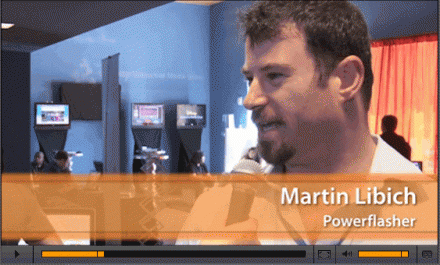
Martin Libich:  Well, I think in the Flash world, in general, what we are seeing and this is crucial for what we do, is the possibility of taking Flash out of the browser. Using the flexibility of Flash to do what has been done on the web anywhere you want, in the store front, at the counter when you are ordering your latte.

The Conference

In this article, HTLM5 vs. Flash at a Flash Conference, Yosun Chang captured the openness and true interest in digital art design and technology that explores and goes beyond Flash. This is valid for FITC, FlashOnTheBeach (FOTB), FlashAndTheCity (FATC), FlashBelt and many other Community driven conferences around the world! So many hard to mention all, sorry !

Yosun has even missed however the presentation about haxe.org another alternative language to ActionScript or Flex ”Everything you wanted to know about haXe, but were afraid to ask”  with Nicolas Cannasse presented at the super cool Influxis Voodoo Lounge
We have also done some interviewed ourselves to some of the haXe fans attending FITC, including the number one fan Nicolas Cannasse 😉


We also had a blast on the rooftop CODAME event, it could not have better a place for Powerflasher to celebrate our first year in USA as a Digital Interactive Development company. Looking forward to new upcoming exciting projects !

A special thanks to our supporters, Gaia Online, Organic, Mypressi and Influxis for the drinks!

I would like to thank @Starpause for helping us to organize the art tech side of the event with the help of @keisukes @andremichelle @radley @calebhaye @jamiew @EvanMorris transmote.com for making CODAME an awesome multimedia experience ! Buck & Sumit as great hosts of the now legendary San Francisco rooftop residence!

And big thanks to the fog for passing by and make the CODAME event a full San Francisco experience!

Check it out yourself in this Photo Gallery taken by @photonburst and video taken by @keisukes

FITC was definitely fun and informative, we were glad to see you in our new home, San Francisco, and hope to you here again next year !

@BrunoFonzi

Get FDT5