Up

Share your Content with the FDT Community

You want to join the FDT community? That’s easy, simply send us your news and be part of the FDT community page

[contact-form-7 id=”6383″ title=”Take Part”]

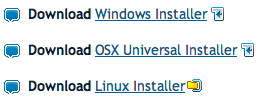
Linux builds have been tested on Ubuntu but should run on other distributions too.

With the download of FDT you accept our EULA

Featured

FDT Views/Editors follow Dark Theme

With this release FDT can easily switched to dark theme:Simply select the Dark theme and apply. The Dark theme is available since Eclipse 4.4 (Luna). Older versions of Eclipse (and FDT) does not support color themes of this form. The FDT views and editors will switch to their default dark color set: In case you […]

by FDT Team

FDT Newsletter

Subscribe to our FDT mailing list and get the latest news and vouchers! * indicates required Email Address * First Name Last Name

by FDT Team

FDT Milestone 10 – 10 years anniversary

We‘re happy to announce FDT Milestone 10! It‘s been 10 years since our first FDT release and a lot happened since last years Milestone 9. We went on to improve FDT and your IDE experience. Here is a list with our new key features: Ant Project Generator Dump launch configuration Library Project Template ActionScript refactorings […]

by FDT Team

Library Project Template

This new FDT release contains features to support a more fluent development of SWC libraries. The primary starting point to develop a library is the new Library Project Template for AIR or Web: This template creates an empty library project containing two source folders: All compilation units to include into the library should be placed […]

by FDT Team

Release 9.9 – Project groups

With this release the FDT Explorer can present projects in groups: Each Project Group is a set of workspace projects (i.e.: Working Set). Each project can be a member of one group and can not be shared among groups. Project Groups are logical structures shown inside FDT Explorer. Neither they represent nor they change the […]

by FDT Team

Announcing FDT haXe plug-in Public Beta supported by Influxis

May 12, 2011 by Carlo Matic

We are happy to announce the FDT haXe Beta plug-in as a public release as part of our contribution to the Flash Community Open Source program.

Developed in collaboration with Influxis, the FDT haXe plugin provides developers a powerful tool for authoring the haXe multi-platform language. Our goal is to provide the best haXe coding experience and that it feels like coding in the AS3 or MXML editor of FDT: same shortcuts, same syntax coloring, same coding comfort.

Here’s a feature overview:

  • Live error checking
  • Autocompletion (variables and functions)
  • Syntax coloring
  • Code editing features
  • Open Type
  • New Class/Interface/Enum wizards
  • HaXe Project Wizard

Here are additional built-in new features of the haXe plugin.

  • Setup an SWF output in your HXML. When it builds, right click on the SWF and select Run As > SWF File.
  • Setup a JS output. Right click on the generated JS file and select Run As > JavaScript in browser or Run As > Node.JS server (NB: needs Node.JS installed, and the project needs to include the haxe/node library from bdog-node on github).
  • Compile haxe to C++. Right click on the generated executable and select Run As > Native Executable (you have to do “haxelib setup ; haxelib install hxcpp” for this to work).
  • Compile to Neko. Right click on the generated neko file and select Run As > Neko VM

More information on the FDT Documentation website.

Some of you might be wondering … What is haXe ?

haXe is an independent multiplatform open source programming language. haXe can publish the same project to Flash, Javascript, PHP, C++, Neko, and in the future it will support more tagets such as Java and C#. haXe helps to leverage the best performance and best features for each platform.

Writing code in haXe is similar to writing Actionscript. Additionally, you could write an application or game that targets Javascript and HTML5 Canvas, or you could leverage server side targets like PHP or Neko so that you can share your classes on both the front-end and back-end. Thanks to haXe you can create an application that runs, for example, on Facebook and runs on an iPad or TouchPad.

The haXe code is MIT licensed, there are no licensing fees or limitations. Most importnat, haXe has a passionate open-source community behind, very willing to help and support developers.

You can find more information on haXe.org

So… what are you waiting for?

Install FDT’s haXe Plugin, just follow the instructions on our haXe FDT Installation tutorial.

More haXe news will be published soon, stay tuned! Follow @FDThaXe to keep up to date on latest development.

Happy Coding from the FDT and Influxis Team!

P.S. Big kudos to Powerflasher’s design team creating haXe new logo! Let us know how you like it.

CODAME – SAN FRANCISCO, MAY 12, 2011

April 26, 2011 by Carlo Matic

ART, TECH & VIDEO FESTIVAL

After last year success, Powerflasher is supporting CODAME again!

We had a lot of fun, we had also André Michelle, from AudioTool, playing some tunes under the San Francisco fog! (Photos)

You might ask: What the F*** is CODAME?

This year CODAME, the ART TECH Festival, will have VIDEO as the main theme.

CODAME is a collaborative film work experience. A unique experience that features the convergence of art, tech and filmmaking with engagement of the audience documenting the moment.

Join other creative minds, cool speakers, independent short films and enjoy local artist’s work  – Music & Drinks included!

WHEN: Thursday, 12th of May, 2011 (the day after GoogleIO)

WHERECELLspace, 2050 Bryant St, San Francisco, CA

Space is limited, please register to guarantee your ticket before we sell out !

SUPPORTERS:

We are also looking for more sponsors to buy more drinks and snacks. If you know someone, have an idea, or would like to contribute Contact us!

Special thanks to our current supporters:

PARTECITPATE:

Be spontaneous, don’t need to be a pro, grab your camera and start shooting!

Before the event:

Send us a video just say CODAME !

Everyone’s invited! If you can’t join us in San Francisco, be there virtually. The videos will be shown May 12th during the event.

During the event:

We encourage everyone to make use of your camera or smart phone and take videos to share on May 12th.

After the event:

Vote for your favorite videos! The win will receive prizes thanks to our CODAME supporters.

Instructions will follow, stay tuned …

Instructions:

Share the videos on you favorite website: FlickrVimeoYouTube

PROGRAM:

Michael Goergens [goove | on the move] and you will be the stars of this event! With a foundation of years of experience in multimedia, Michael enters the stage of documentary film making. He is presenting his current work and you will do the same. Inspire and be inspired!

SESSIONS + SCREENINGS
15 minutes sessions in variation with short movies by Michael Goergens

  • Simultania: a video installation and online experience. People from all over the world film the same 1-minute-moment in time. All the simultaneous perspectives play back together and in perfect sync, using an innovative video playback platform. (Erin CooneyMartin Libich)
  • Powerflasher: The Digital Creative Team of Application Developers. Either Web, Mobile or Desktop, Powerflasher applications likes to run on all type of screens, including the big ones. Let’s enjoy together this interactive movie experience developed by the Powerflasher team (Bruno Fonzi)
  • NorthenDragons: Beat the Demoscene Elite. Get a glimpse into the digital art underground known as the demoscene (think crack intros on steroids). Then K9D from the Northern Dragons will demonstrate how easy it is to begin expressing your creativity with code. (Jordan Gray)

PROJECTS
Local art tech artist projects will be also on display. This event will be a blast !

  • PuppySpazz is a San Francisco based amateur artist who advocates for empowerment through self-expression and the diversification of eroticism. PuppySpazz will be performing live digital drawing.
  • “Video Mirror” from Eric Socolofsky
  • Get a chromataphoric face mask with a new application, first shown at CODAME, from Muse.

More Artists to be announced soon, stay tuned …

SOUNDS

  • STARPAUSE plays electro/techno/idm produced on portable consumer electronics.
  • RAYREADYRAY founded Secret Feature, you’ve likely seen his data visualization work in San Francisco Arts Quarterly. He’s also a tenderloin resident, often spotted at his wife’s gallery Kokoro Studio.
  • HARBOUR is resident DJ at 9th Floor Radio & organizer of Knitworks, a night of fresh electronic sounds at koko cocktails, producer of immersively organic cut and paste hip hop instrumental jams.
  • Christopher Heston injects live his recorded soundscapes from all over the world and creates the sensation of experiencing particular acoustic environments.

Lead Organizers: Bruno FonziMichael GoergensJordan Gray

With the help of: GoGeekly

FDT 4 is released!!!

September 24, 2010 by Carlo Matic

Monday, September 27th 2010 you will be able to buy the new FDT 4 Pure, Plus or Max.

We are excited that FDT 4 is being considered the best Powerflasher release ever, and it’s thanks to you!

A bit of history

When Powerflasher was founded in 1997 as a digital interactive agency, many flash developers were missing a professional ActionScript code editor to build cutting edge software applications. In the year 2001 we decided to start building our own IDE based on Eclipse. The developers loved it and it spread like crazy. FDT 1.0 was born!

FDT 4 and the community

Starting in January 2010 with the release of FDT 3.5 we traveled the world to meet you at work, conferences (and of course some great parties). We openly shared the FDT 4 roadmap with you and, being big agile advocates, we made our internal iterations/sprints public free Milestones! We worked iteratively with you and we worked hard! Your contributions, constructive support, and great ideas were an integral part of the FDT 4 release and we think you’ll be pleased with the spectacular list of new features.

ActionScript 2 support

As Adobe is moving away from ActionScript 2, so is Powerflasher putting more effort into future languages as well. We however acknowledge there are still many projects developed in AS2, including some new exciting embedded devices applications. For this reason, we have decided to still offer FDT 3.5 with the full Enterprise features with AS2 support as an option for all FDT 4 customers for 99$

FDT Labs

In parallel to our milestones, we created the FDT labs, an open playground. We built the SDK  to empower you to create your own plug-ins and you did: The haXe (Beta) plug-in supported by Influxis and the FDT Code Metrix Pflection plug-in from iceX33. The Dependency Visualizer and Font Creator born from the labs playground as plug-ins are now core functionality of FDT 4!

We are committed in providing a cross-platform experience. We are very proud to have the opportunity to extend Linux support in our Labs with the help of the community.

New product names: Pure, Plus and Max

We kept the name Pure because we could not express better what the FDT Pure Coding Comfort is about. Pure great editing features enables the smooth workflow you are all raving about. FDT Professional is now called Plus. In addition to the Coding Comfort, Plus adds the navigation features to help you become more productive and work collaboratively. FDT Enterprise becomes Max. FDT Enterprise is not only for corporations, if you are either a freelancer or working in a team of power developers, performance is what you need! It’s about enabling developers to break barriers and maximize their productivity by taking advantage of state of the art IDE features power developers truly deserve.

New Prices

Since then we have released several upgrades, mostly for free. The last upgrade we charged was in the beginning of 2008 with the FDT 3 Enterprise release. For about tree years all upgrades were available for free, including FDT 3.5. We also decided to give all new FDT 3.5 buying customers a free FDT 4 upgrade! It’s now time to pay the bills and further invest to keep the engineering team and you happy.

Check the prices on our website.

Now get your hands on FDT and start coding.

Please use this temporary license until a new pesonalized key is available starting this Monday, September 27th 2010

Follow this link to Register and Download FDT 4

Special thanks…

The FDT 4 release is a result of this journey, thanks to your support and the passion of the big Powerflasher FDT family!

Stephanie, Meinhard, Philipp, Sebastian, Simon, Florian, Maxim, Keisuke, Olli, Britt, Stefan(s), Timo(s), Andre, Mattes, Alan, Clement, Bruno, Michael, Nico, Robertina, Sabrina and Carlo, the Powerflasher Developer and Designer Team (aka FDT guinea pigs) and last, but not least, you!!!

FDT haXe Plugin Public Alpha 2 Released

September 24, 2010 by Carlo Matic

Powerflasher, in collaboration with Influxis, is proud to release the second public alpha of the haXe plugin for FDT!

This new version builds on the first alpha by providing a greatly enhanced auto-completion system, complete with automatic imports and class lookup, as well as a much needed improvement in compiler configuration by supporting the use of HXML project files. We at Powerflasher now feel that the haXe plugin for FDT provides the ultimate coding experience for the haXe language.

Here’s an up-to-date roundup of the features supported in the alpha 2 release:

· Live error checking

· Greatly enhanced auto-completion capability

· Syntax coloring

· Class / Enum / Interface file creation wizards

· Full HXML file inclusion

Installing the haXe Plugin Alpha 2 Release
If you are new to the haXe plugin alpha for FDT, you can install quite simply by following the steps below.


1. First, download the latest version of FDT4 Beta release by visiting this link and install it.
2. Download the haXe installer for your operating system from http://haxe.org/download.
3. Run the haXe installer, selecting Yes when asked if you wish to install the Neko runtime.
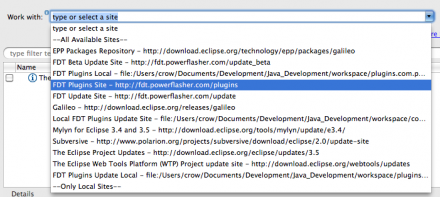
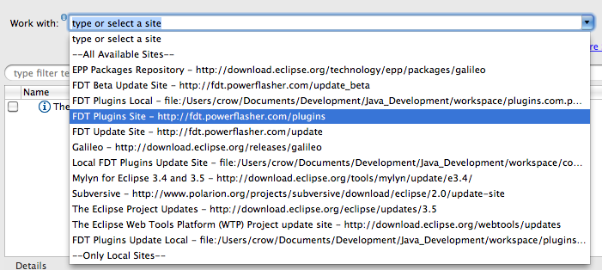
4. Select the “FDT Plugins Site” update site. (If it is not included in your drop down menu, enter: http://fdt.powerflasher.com/plugins in the “Work with” text input and hit return)
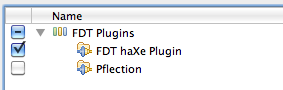
dhspwgc_108djw2z74p_b5. Select the option “FDT haXe plugin” from the items presented and click Finish. Allow the installation to complete.


Configuring the haXe Plugin
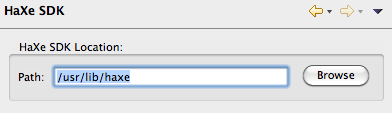
Before the newly installed haXe plugin can be used, it will need to be configured so it knows where to find the haXe compiler on your machine. To do this, select Window->Preferences from the menu and navigate to the HaXe->SDK option. You should be presented with a textfield control with the label HaXe SDK Location. Click the browse button next to this field and navigate to where your installation of the haXe compiler exists, then click OK on both dialogs to close them. On windows machines, the haXe installation will usually exist at the location:

C:\Motion-Twin\haXe

Mac OSX users may want to try:

/usr/lib/haXe

Using the haXe Plugin
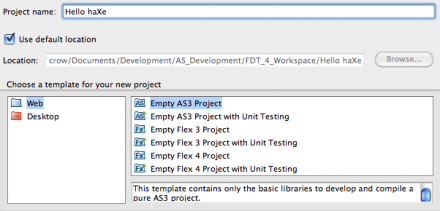
Now for the fun stuff. Create a new AS3 project by selecting File->New from the menu and choosing “Empty AS3 Project” from the presented list of options. In the field titled Project name, enter “Hello haXe”. Now click OK.

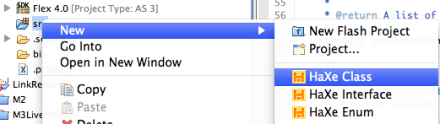
Now, right click on the src directory in the project file tree and select New-> Haxe Class. If this option does not appear in the context menu, FDT will need to be refreshed. You can do this by selecting the menu option Window->Reset Perspective.

When the new class dialog is displayed, give the class the name “Main” and click OK. A new file should now exist in the src directory.

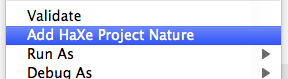
We now have a haXe project and class file, which is great, but we haven’t yet told the haXe compiler what type of project we’re building. To do this, right click on the project node in the file tree pane and select Add HaXe Project Nature. This will raise a new wizard. You can immediately click the next button, as we are not interested in modifying the haXe SDK location for this project.

The second screen in the new wizard provides the option to specify the target platform for our project. Currently, this includes:

· Flash9 SWF (AVM2 target)

· Flash SWF (AVM1 target)

· Javascript

· AS3 Code

· Neko Binary

· PHP Code

· C++ Code

Each of these target platforms are fully supported by the FDT plugin and we recommend that you play with this option at your leisure. However, for this example, choose the Flash9 SWF option.

If you look in your project file list, you should notice a new file with the extension “.hxml”. This is your project compiler settings. You can alter this file by right-clicking it and selecting Open With->Text Editor. Simply double clicking the file will launch the haXe compiler if using the Windows installation of FDT.

The haXe plugin supports a wealth of compiler switches and options, and we advise that you read about them on the haXe website at http://haxe.org/doc/compiler.

Open the Main class and enter the following code:

package;

class Main {
public static function main() {
trace( “Hello, World” );
}
}

Save this file and run it. A new SWF file will be compiled into your project directory.

We at Powerflasher, along with Influxis, are very excited about the new possibilities provided by this plugin and, as always, we would welcome any feedback, bug notifications and feature requests you may provide. We encourage all such information to be posted on our issue tracking website. With your help, we aim to make FDT a truly unique experience for applications development.

What’s Next?
We are currently busying away on the haXe plugin for a major Beta release. This will include the ability to create haXe projects using FDT’s fully integrated project wizard as well as being able to compile and launch directly within the FDT workflow. We aim to make FDT the best haXe development environment available just as it is for Flash!


CODAME Event in San Francisco

July 31, 2010 by Carlo Matic

NEWS UPDATE !

In addition to Gaia Online, we have a new supporter:

Organic, this means fun is guaranteed for everyone 😉

About Gaia Online
Founded in 2003, Gaia Online is the leading online hangout for teens and young adults. More than eight million visitors come to Gaia Online every month to make friends, play games, and participate in the world’s most active online community. Gaia Online provides a fun, social environment that inspires individuality and creativity. With everything from art contests to discussion forums on poetry, politics, celebrities and more, to fully customizable profiles, digital characters and cars, Gaia Online is a place where teens can create their own space and express their individual style. For more information, visit www.gaiaonline.com.

________________________________________________________

After years of waiting an inspiring and great Flash event returns to San Francisco and we want to celebrate and share the excitement with you around FITC with CODAME

If you are a geek, designer or developer join CODAME, a San Francisco party for the tech industries greatest creative minds, packed together on a roof deck with the brightest Bay Area Art Geek regulars.

CODAME is an invitation only exclusive gathering, space is limited.
Monday, 16th of August, 2010 (day before FITC starts) at 8pm til midnight.

Final confirmation and exact location will be sent some days before the event, only to registered people.

Starpause, André Michelle and TrustFundKilla (LostScience) will be playing some tunes on the roof-top. Local art tech artist projects will be also on display.
Plus, amazing location- private roof-top downtown San Francisco – with superb view included. This event will be simply a blast !

We have some amazing local volunteers helping. If you want to help too, show your work under the stars or have a cool idea for the event. Contact me!

Powerflasher is one of the main sponsors for this event celebrating one year anniversary in USA as a Digital Interactive Development company.

We are looking for more to enhance the quality and quantity of food and drink. We would need some more sponsors to buy enough drinks and snacks for everyone, if you know someone, have an idea, Contact me!

Thank you so far for the following supporters:

Gaia Online Founded in 2003, Gaia Online is the leading online hangout for teens and young adults. More than eight million visitors come to Gaia Online every month to make friends, play games, and participate in the world’s most active online community. Gaia Online provides a fun, social environment that inspires individuality and creativity. With everything from art contests to discussion forums on poetry, politics, celebrities and more, to fully customizable profiles, digital characters and cars, Gaia Online is a place where teens can create their own space and express their individual style. They are hiring, so look out !

Organic is a leading digital communications agency that uses a consumer-empathy-based approach, combined with a holistic view of the digital landscape, to design and build exceptional interactive experiences that effectively engage and persuade customers.  Founded in 1993, Organic has offices in New York, San Francisco, Los Angeles, Detroit, London and Toronto.  Adweek ranked Organic as the number one interactive agency in their 2007 interactive agency report card. Organic is a part of Omnicom Group Inc.

Mypressi has become the rockstar of the espresso world with the first handheld device that can make a perfect shot of espresso with water or, more relevantly, any other liquid. They will be pulling amazing shots at the CoDaMe Party. Stop by for some super smooth ‘spro-based cocktails. And remember, always code responsibly.

Influxis powers interactive Flash applications and the best parties for the community 😉 The team will have its own bar and serving very hot cool cocktails during CODAME, I hope you can handle it!

FITC knows how to build amazing flash events! FITC has been generous to support CODAME by offering major discounts if you decide to support CODAME too, we need more more drinks and food for hungry flash developers & designers.

If you think you can help, can be a supporter or should be simply invited, contact @BrunoFonzi

FDT haXe plugin public alpha version released

July 22, 2010 by Michael Plank

The community has been screaming for haXe support in FDT. We are thrilled today to announce the public alpha release of the FDT haXe plugin!

Developed in collaboration with Powerflasher and Influxis, the FDT haXe plugin provides developers a powerful tool for authoring the haXe multi-platform language. Our goal is to provide the best haXe coding experience and that it feels like coding in the AS2, AS3 or MXML editor of FDT: same shortcuts, same syntax coloring, same coding comfort.

Here’s a feature overview of the public alpha version:

  • Live error checking
  • Autocompletion (variables and functions)
  • Syntax coloring
  • Code editing features
  • Open Type
  • New Class/Interface/Enum wizards

You can follow our development progress on Twitter @FDThaXe

Watch the first live demo of the FDT haXe plugin I showed at Flash Camp Manchester in the recording from Adrian Parr starting at minute 38 here.

Getting started with the FDT haXe plugin (alpha version)

Installation

  1. Download the latest version of FDT4 Beta release here
  2. Go to http://haxe.org/download and download the installer for your OS.
  3. Run the installer.
  4. Start up FDT 4 and select Help > Install new Software
  5. Select the “FDT Plugins Site” update site. (If it is not included in your drop down menu, enter: http://fdt.powerflasher.com/plugins in the “Work with” text input and hit return)
  6. Select “FDT haXe Plugin” from the plugin list, hit finish and follow the final installation steps.

Setting up the haXe Plugin

  1. First of all you need to configure the haXe SDK: Go to Preferences > haXe SDK and insert the haXe installation directory
  2. Now create a new “Empty AS3 Project”, name it “Hello haXe” and click Finish
  3. Right click the src folder and select New > HaXe Class (if you don’t see it select Window > Reset Perspective from the Menu)
  4. Call the new Class “HelloHaxe” and click Finish
  5. Right click the Project and select “Add HaXe Project Nature”
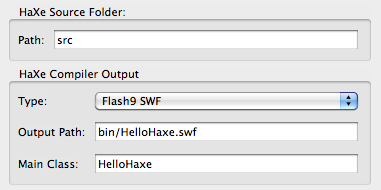
  6. Click Next and set the Type to “Flash9 SWF”, the output file to “bin/HelloHaxe.swf” and the Main Class to “HelloHaxe”
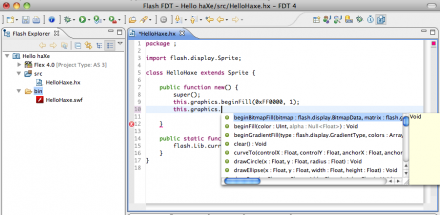
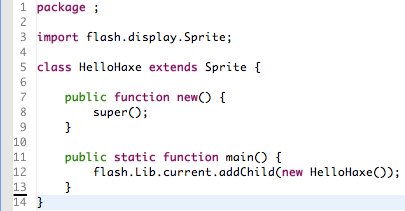
  7. Extend Sprite and add the constructor and the static main function. The final class should look like this:

That’s it, you’ve successfully set up your first FDT haXe Flash project!

Start Coding

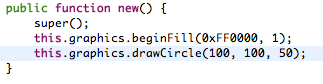
Start adding code in the constructor for example:

Please note, the SWF is compiled on every Save, no specific launch configuration is available yet. This is our first Alpha release, please bare with us !

For any feedback, feature requests, improvements, bugs and other issues we encourage you to use our community driven tracking website to make the haXe support in FDT the greatest ever.

We would also advice to subscribe to the haXe mailing list, it is a very active group with smart people and interesting topics.

On the behalf of the FDT Team and Influxis, I hope you are as excited as we are and enjoy the first available version of the FDT haXe plugin,

Michael Plank

Get FDT5